 ObjectExplorer
 Give an agent production data?
An agent gets rows, never keys.
An agent needed to read one folder of production data to answer a question. Someone created an access key, pasted it into the agent's environment, and everyone moved on. I was one of the people who moved on, and it has bothered me since.
Today
The agent needed data from one folder. The cloud has one kind of thing to give out for that: a credential. So an access key was created in the console, with a role that could read storage, because narrowing a role to one folder is a policy document most of us write by trial and error. The key went into a shell variable in the agent's environment.
From then on the agent could read every bucket that role could read, for as long as the key lived. If someone asked next month what it had actually read, the honest answer would have been that the access logs might say, if they were switched on, in terms of which principal read which prefix.
- Cloud consolecreate an access key
- Terminalpaste into env
- Agentwhole account, forever
- Nobodyknows what it read
Nobody was careless. The console issued a key, which is what it is for. The agent used it as intended. The shared assumption was that giving an agent data means giving it a credential, and a credential is close to all or nothing.
Ideal
So I tried to start from what the agent wanted. Not a key. It wanted answers to questions: what is in this folder, what are the columns of this file, how many rows match this. Every one of those is a small, specific request.
That suggests a door instead of a key. Something that already holds the sign-in sits between the agent and the buckets. The agent asks it questions. It answers from the folders I have allowed, refuses everything else, and never hands over the sign-in itself. Because it sees every question, it can also hold limits: this many rows per answer, this many bytes per day, this many calls a minute. And it can hide the columns that should never leave, whatever the agent asks for.
This is not a new idea. It is what a database server has always been to its clients. The difference is that the thing behind the door is object storage, and the questions come from an agent.
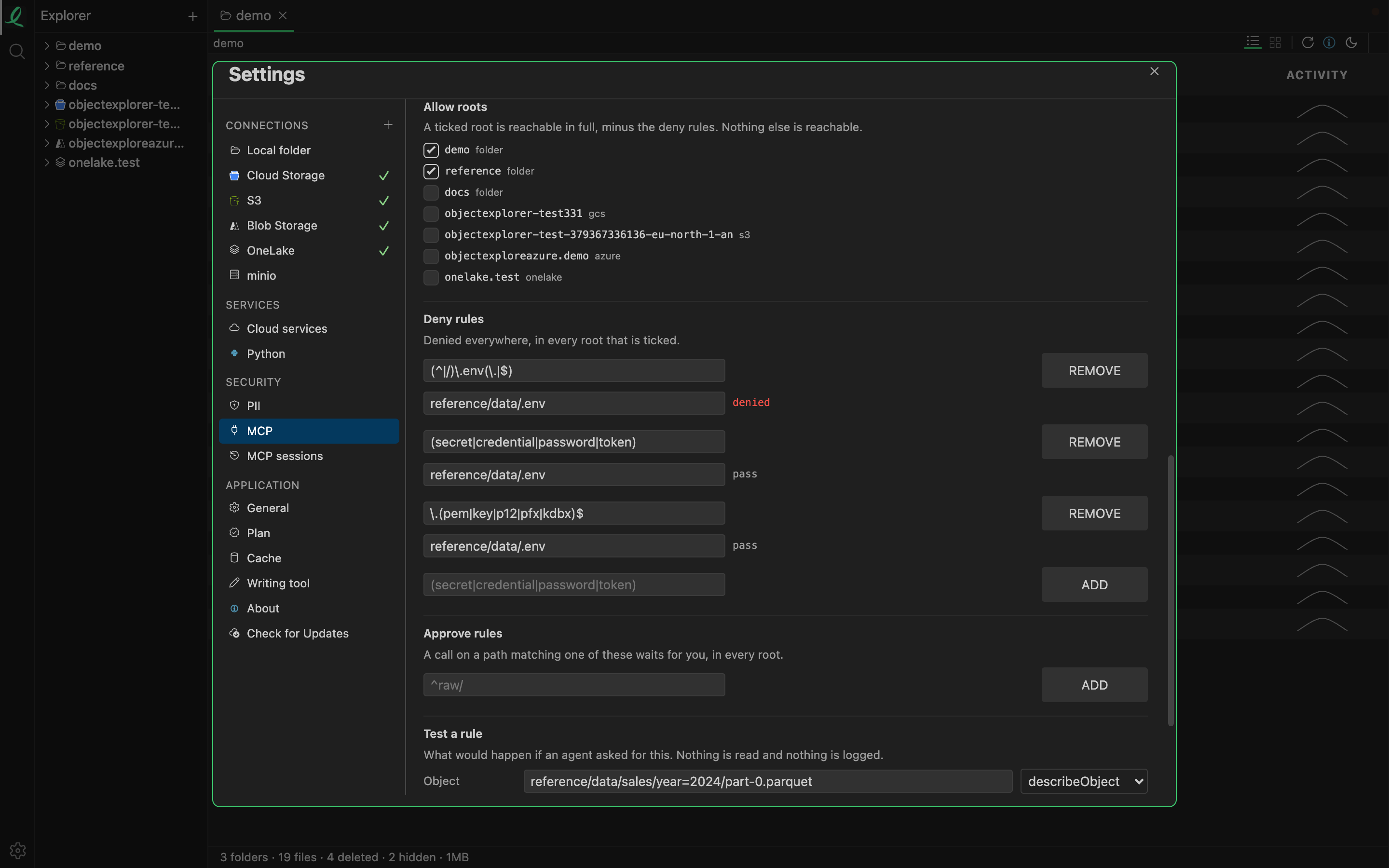
That is the pane where the door is set up. In the code, the rules live in one file, and with no file there is no server at all: nothing is reachable that isn't written in it. An agent is offered a short list of tools, such as listing a folder, describing an object, summarising a column and running a query, and each one becomes a request to the app's own server, which holds the cloud sign-in. The only secret the agent's configuration receives is a token for that door. Deny rules are patterns matched regardless of case. The default limits are 10,000 rows and 32 MB per call, 1 GB per session, 4 GB a day, 60 calls a minute and 1,000 objects per listing. Every answer passes through the same floor that hides sensitive columns in a share.
Where it stops
The door is only as good as the rules written into it. A root that is ticked is reachable in full, and a deny pattern that is written too narrowly will let through what it was meant to stop. The pane has a way to test a path against the rules before an agent tries it, and I think that is where the real work lives.
It also runs where the app runs. The agent reaches the door on this machine, and the door reaches the clouds with my sign-in. That is right for one person and their agent. For a team sharing one agent, I am not yet sure what the door should look like.
An agent gets rows, never keys.