 ObjectExplorer
 Know if a file is really here?
A file is here, or it isn't.
I opened my laptop on a plane to work on a file I had been using the day before, and it wasn't there. The folder was there. The name was there. It said two gigabytes. The bytes were not.
Today
The file lived in a folder my sync client keeps in step with the cloud. The day before, I had seen it in the list with its name, its size and the same icon as every other file. What I didn't know was that the sync client was in streaming mode. It had listed the file without downloading it, and the size in the list was the size of the file in the cloud, not the space it took on my disk.
Without a network, opening it failed. A mounted bucket behaves the same way: it lists every object in the bucket, with sizes, and almost none of them are on the disk until something reads them.
- Sync clientfolder looks full
- File browsername, size, icon
- Planeopen it, nothing
- Mounted bucketsame promise
The sync client wasn't wrong to stream. Keeping every file of a large drive on a small disk would be worse. The file browser wasn't wrong to show the size it was given. The shared assumption was that a file shown in a list is a file on the machine, and for most of computing history that was true.
Ideal
So I tried to think about what I needed to know. A file is either on this machine or it isn't. That is one bit, and it is the one fact about the file my own computer can answer exactly, without asking anyone.
How does it know? A file on disk takes up blocks. The operating system reports two numbers for every file: its size, which is what the file says it is, and the blocks it has allocated, which is what it actually occupies. A placeholder from a sync client reports its full size and allocates nothing. So a file with a size and zero blocks is a promise, not a thing.
There is one catch. A sparse file, which some programs write on purpose, also allocates less than its size. So the check is only safe inside a folder that a sync client owns, where "allocates nothing" means the provider is holding the file. Anywhere else, the honest answer is "I don't know".
And then show it. Not on hover, not in a properties dialog. In the list, beside the size, where I am already looking.
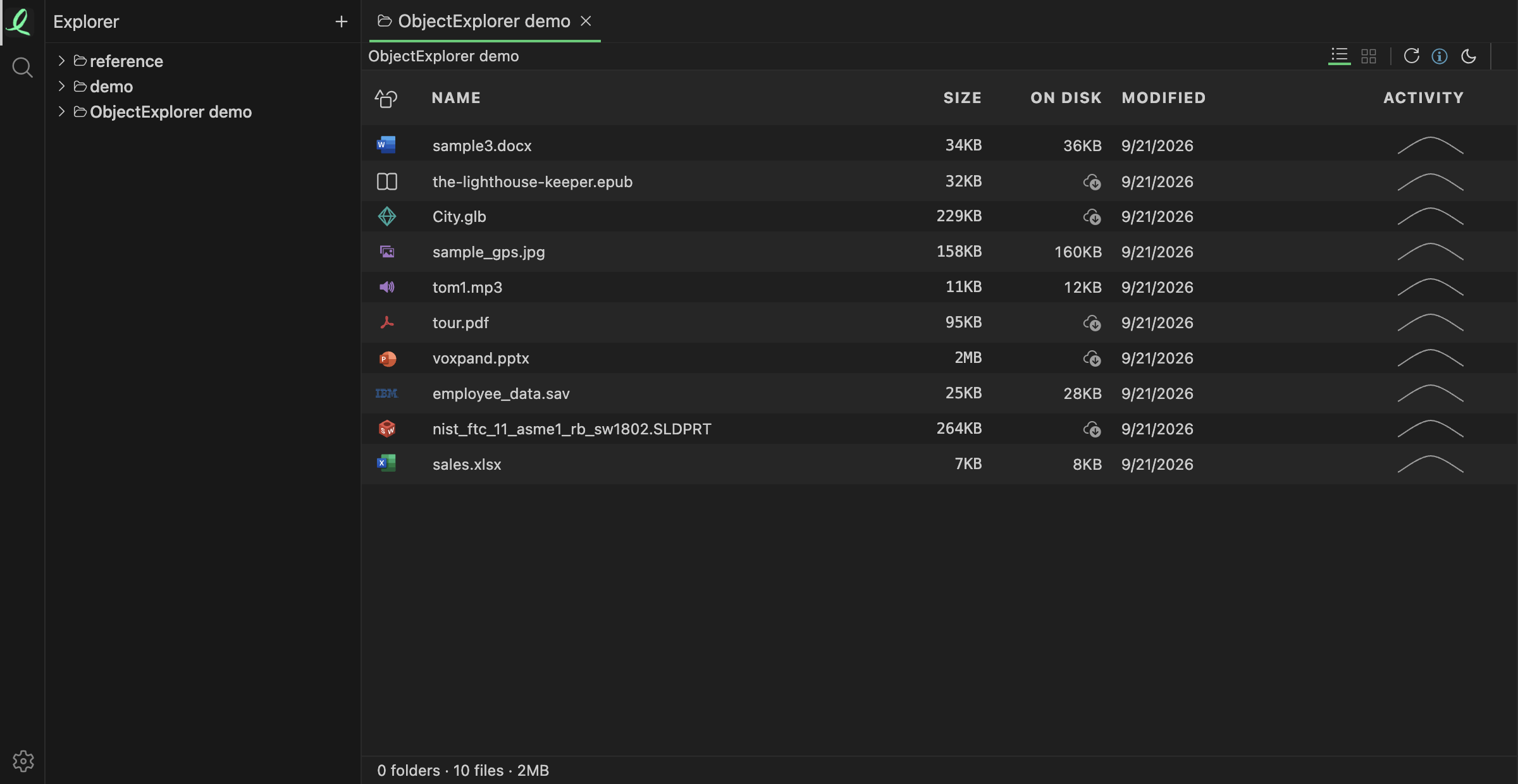
That is the ON DISK column, beside SIZE, in a folder of iCloud Drive. Every file has a size; only half have bytes on this disk. The tour PDF says 95 KB in SIZE and nothing in ON DISK, which is exactly what the plane would have taught me. In the code, the synced folders are found once per run: on macOS the provider folders under Library/CloudStorage and iCloud Drive, on Windows the sync roots registered with the system. Inside them a file with a size above zero and zero allocated blocks is a placeholder. The column shows the blocks times 512 bytes when there is something on disk, and a download icon when there isn't, which fetches the file when clicked. For a bucket, the same column shows what the local cache holds.
Where it stops
On Windows the synced folders are found, but the operating system's file information doesn't include allocated blocks the way macOS reports them, so every file there reads as unknown and the column is not shown at all. On Linux there is no sync provider to ask about yet. The one bit is only answered on a Mac.
It also answers for the moment the folder was listed. A sync client can evict a file a minute later to free space, and the list won't know until it is read again.
A file is here, or it isn't.