 ObjectExplorer
 View a file in cloud storage?
One click, rendered.
Someone left four files in a bucket for me: a deck, a spreadsheet, a CAD part and an export from a statistics package. I wanted to look at them. Not edit them, not keep them. Look. It took four applications, and two of the four files I never saw at all.
Today
The console listed the files with a name, a size, a date and a download button. That is all a console offers for a file, on any of the three clouds. So I downloaded the deck, and it opened in a presentation app. I downloaded the spreadsheet, and it wanted a different app. The CAD part wanted a CAD program, and the one that reads it costs a licence I don't have. The statistics export wanted a package nobody on my machine had installed, and I was not going to install one to glance at a table. I asked the people who made them to send me screenshots.
- Cloud consoledownload each file
- Slides appopen the deck
- Spreadsheet appopen the sheet
- CAD programno licence
- Stats packagenot installed
- Chatask the author
Nothing broke. The console stored the files and handed them over when asked. Each app opened the format it was built for. The trouble is an assumption every step shared: that seeing a file means owning a copy of it and having the right program installed. Every file had to leave the bucket and find its own app before I could look at it.
Ideal
So I tried to start from what I wanted, which was to see what was in each file. Then the question becomes: how did those four apps know what to do with them?
Mostly the file told them. A name ends in an extension, and many binary formats also start with a few fixed bytes that name the format. A parquet file begins with the letters PAR1. An SPSS export begins with $FL2 or $FL3. A SQLite database begins with the words "SQLite format 3". A STEP part, the format CAD programs trade in, begins with ISO-10303-21, the number of the standard that defines it. These markers were put there on purpose, so a program could tell what it was holding without being told.
If that is true, then whatever is showing me the folder already has everything the four apps had. It can read the name, and when the name is not enough, the first bytes. It can then pick a way to draw the file, the same way I would pick an app, except without the download and without the install.
The hard part is that someone has to write a reader for each format. There is no shortcut there. But there is a finite number of formats that people actually leave in buckets, and each reader only has to be written once.
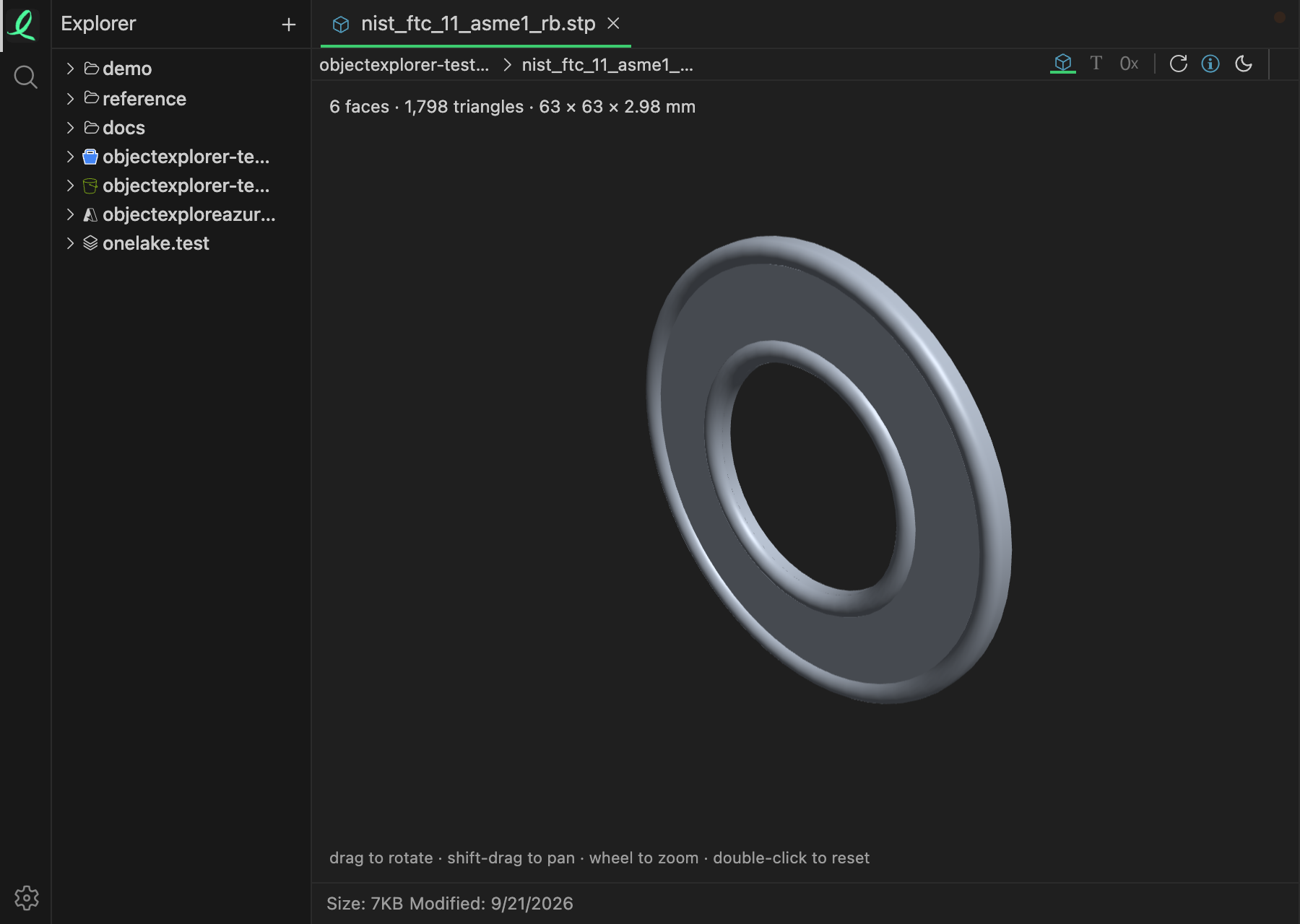
That is the CAD part, a STEP file of 7 KB, opened in place from a bucket. It is a washer, and the reader built its surfaces into 1,798 triangles to draw it; drag it and it turns. In the code I work on, the list that maps an extension to a kind of view has 196 entries, and a separate check recognises seven data formats from their leading bytes, 64 of them at most: SQLite, DuckDB, SPSS, SAS transport, parquet, Avro and ORC. The statistics export I could not open that day has a reader of its own now, and so do STEP, SolidWorks, CATIA and DWG.
Where it stops
A reader has to exist for the format. When it doesn't, the file falls back to text or to raw bytes, which is honest but not much of a view. And "opened in place" still means the bytes travel to my screen. For a small file that is the whole file. What it does not mean is a copy in my Downloads folder and an app I had to install.
I am also not sure where the line is. A deck with embedded video, a spreadsheet full of macros: a viewer will show them, but it will not be the app they were made in, and some people need exactly that app.
One click, rendered.