 ObjectExplorer
 Watch an agent work?
See what it reads, while it reads.
An agent spent four minutes answering a question about my data. For those four minutes it had my folders, and what I had was a spinner. I wanted to know what it was looking at while it looked, not afterwards.
Today
The terminal the agent ran in printed a line for each tool it called, folded to a name and a few characters of arguments. I could expand them one by one, but they arrived faster than I could read them, and a tool name is not a file.
So I did what I would do for any other program touching storage. I opened the cloud console and searched the access log for the agent's principal. The entries were there, but they came in later, and by the time I found the right ones the agent had finished and its answer was already on my screen. I was reading about the run instead of watching it.
- Terminala spinner, folded lines
- Cloud consolesearch the access log
- Cloud consoleentries arrive later
- Terminalanswer already given
Nobody did anything wrong. The terminal shows what the agent decided to do. The access log records what storage was asked for, when it gets round to it. The assumption both of them share is that watching an agent is something you do after it has finished.
Ideal
I tried to start from what I wanted while it worked. Not a list of tool names. I wanted to see the thing it was reading, the way I would see it if I had opened it myself.
Then the question is who knows, at the moment of each call, which object is being read. The agent does, but it is busy. The storage does, but it reports late. In between, if the agent reaches data through a door that decides every call, the door knows, and it knows first. In the code each call is appended to the session's log file, and only then published to anything watching, so a window that is closed or slow changes nothing about the record.
The window is already a program that opens objects. So it can open the one the agent just read. The hard part is speed: an agent makes calls in bursts, and a window flicking through twenty files is no better than a spinner. What I built opens the first object of a burst at once and makes the ones behind it wait, 400 milliseconds by default, adjustable from 10 to 2,000. A refused call opens nothing, because there was nothing to see.
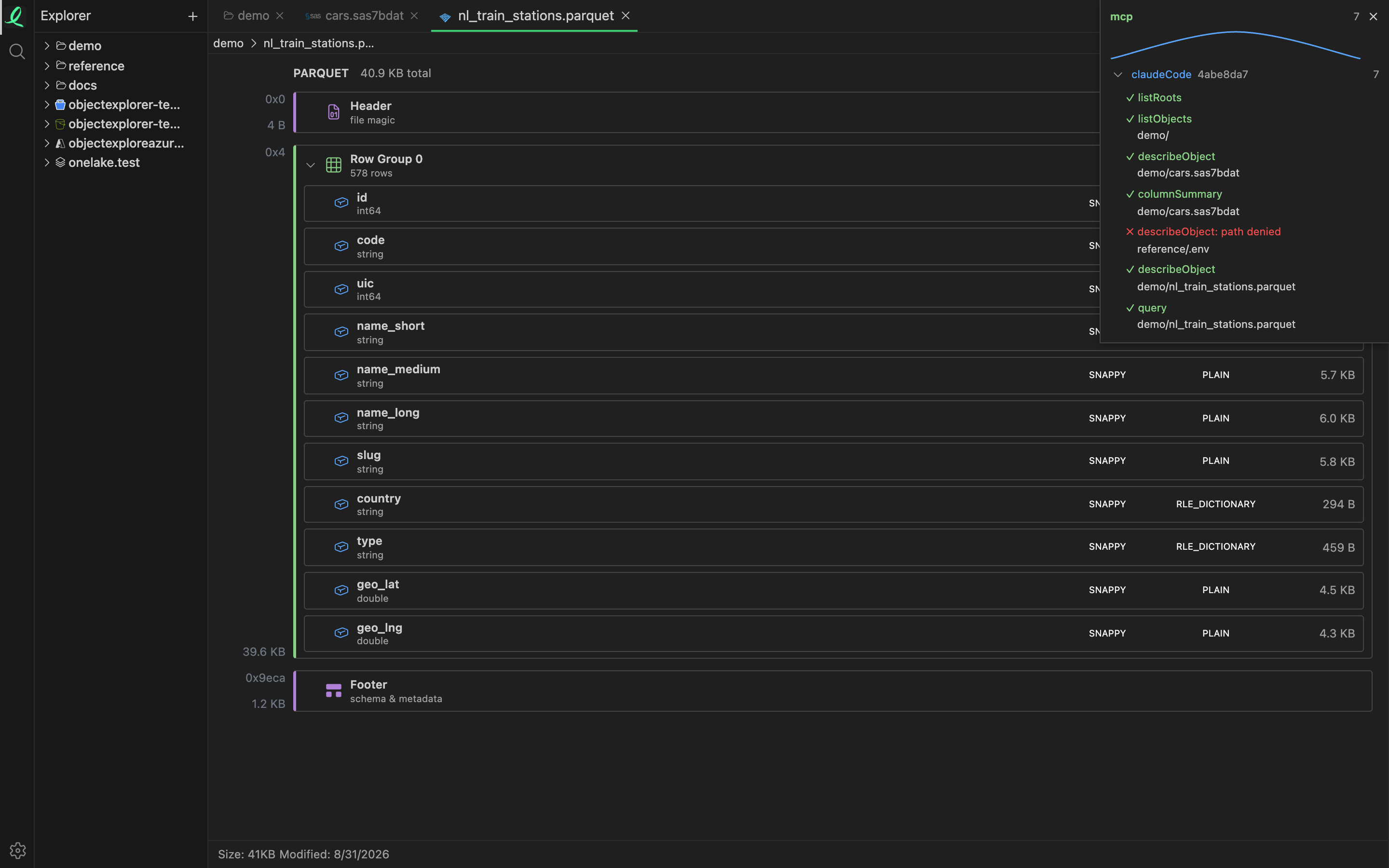
That is one session, watched. The panel in the corner lists the calls as they arrive, with the reason on any that were refused. Here reference/.env was stopped by a deny rule and reads path denied. When the panel is closed, a small dot stays in the corner and lights for 600 milliseconds on every call, so a run of calls keeps it on and a single one is a blink. Clicking the dot opens the panel and turns following on. Escape turns it off, and the log keeps recording either way.
The same stream carries approvals. A call that matches an approve rule waits for a person, and the window shows who is asking, which tool and which object. The starting rule file gives it 300 seconds, and no answer is a no.
Where it stops
It only sees what goes through the door. An agent that also holds a key of its own reads with that key where nothing is watching. And following is a choice made per window. It starts off each time the window loads, so an agent that begins while nobody has clicked the dot is recorded, and the dot blinks, but nothing opens.
Because of the wait, a fast burst shows the last object it touched, not every one. The panel lists every call, but the window cannot open twenty files at once, and I don't think it should.
See what it reads, while it reads.