 ObjectExplorer
 Where did it go?
Rename a file. It's still that file.
I needed a file I had renamed six months earlier. My memory had kept the old name, so that is the one I typed into the console's search box. It found nothing.
Today
The console's search matches the start of a name in the current folder, so first I tried it in the folders I thought were likely. Nothing. Then I listed the whole bucket from the terminal and grepped for the old name. Nothing again, and this time I understood why: on every one of these clouds, a rename is a copy to the new name followed by a delete of the old one. After that, the old name doesn't exist anywhere. There is nothing left to match.
So I browsed folders by hand, opening the ones that seemed right and reading the lists, until I recognised the file by its size and date.
- Cloud consolesearch the old name
- Terminallist the bucket
- Terminalgrep, nothing
- Cloud consolebrowse by hand
Nothing malfunctioned. Object storage has no rename, only copy and delete, and the console and the command line reported exactly what was there. The shared assumption was that a name is the identity of a file, so when the name changes, the old identity is gone with it.
Ideal
So I asked what a name is. It is a label I put on some bytes. When I renamed the file, I peeled one label off and stuck another on. The bytes didn't change. What they meant to me didn't change. Only the label did.
Something was also watching when it happened. If a tool lists a folder today and listed it last week, it can compare the two. A name that disappeared and a name that appeared in the same folder, with exactly the same size, are very likely one file that was renamed. That is a guess, not a fact, and it should be written down as a guess. But it is a good guess, and it is the only evidence left once the storage has deleted the old key.
If that record exists, then search can use it. Type either name and get the same file, with a note that it used to be called something else. The old name is history, not garbage.
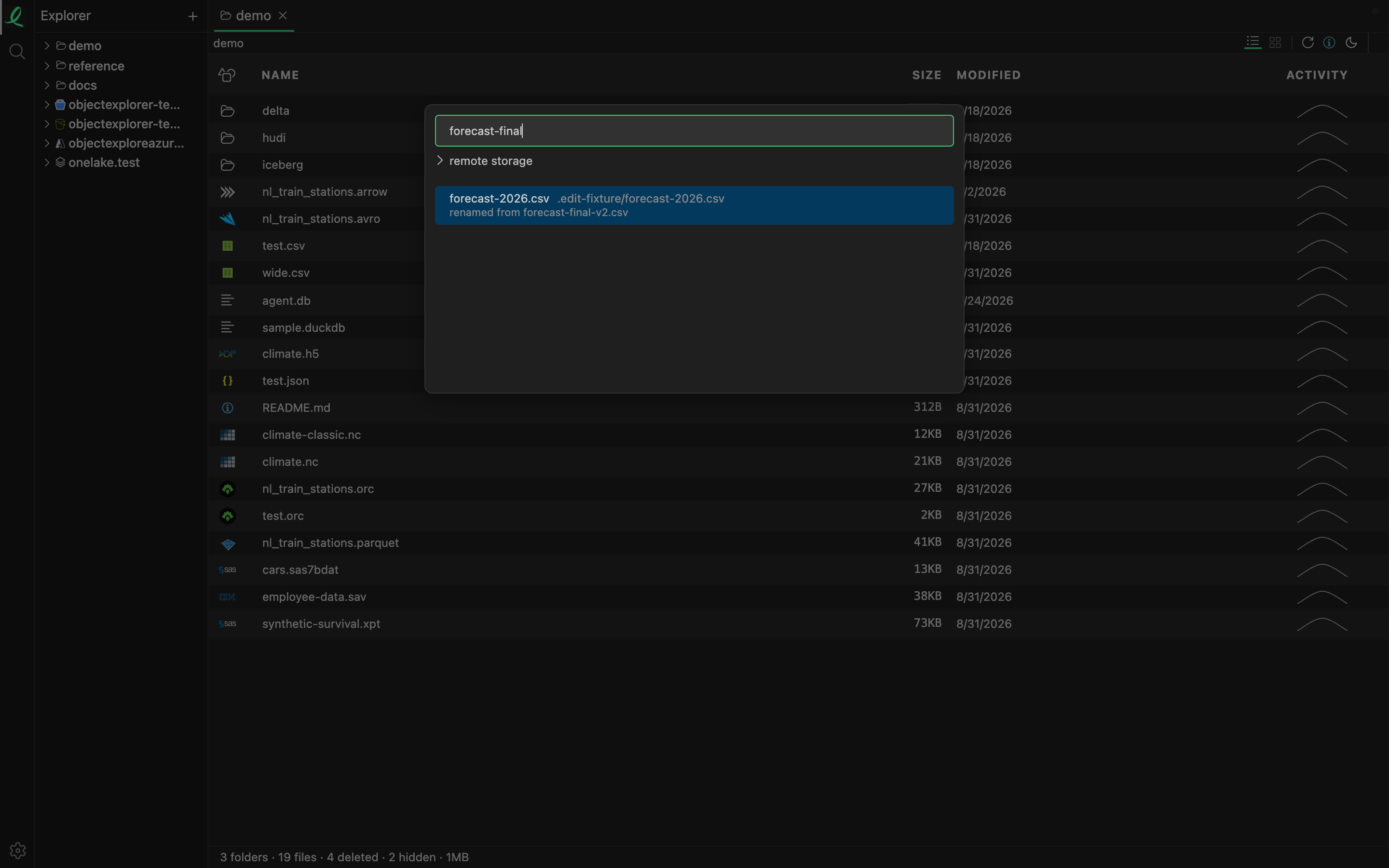
That is Quick Open with the old name typed. It found the file under the name it has now, and said where the old name came from. The record behind it is written two ways. A rename done in the app is a fact, so it is written down as it happens, and the file keeps its identity instead of being filed as one deleted and one new. A rename done somewhere else is the guess above: when a folder is listed again and a file that went and a file that arrived have the same size, they are taken to be one file, and the change log gets a row with both names. Quick Open asks that log before it searches the names of today, and a match by an old name sorts below every match by a current one.
Where it stops
It is the names I type into Quick Open, not everything. The search across file contents doesn't look at old names, because it searches what is inside files, not what they are called.
A move to a different folder is still a delete and a create, so a file that changed folders can't be found by where it used to live. A rename done elsewhere only counts if the folder was listed both before and after it. And two files of the same size swapped in one go would be matched the wrong way round. I would rather say that than pretend the guess is a fact.
Rename a file. It's still that file.