 ObjectExplorer
 Writing
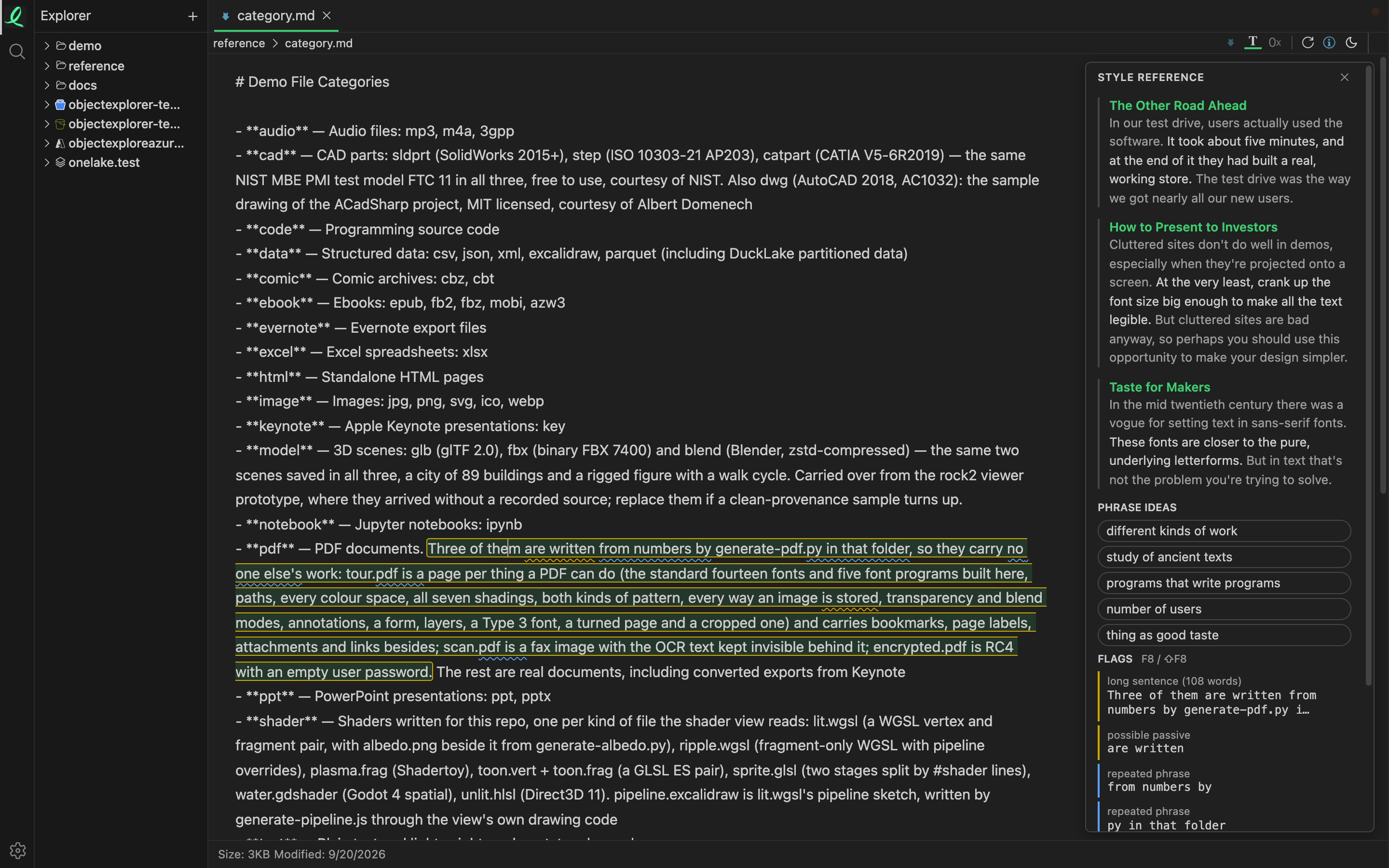
A Markdown file in a local folder is something you can write in, not only read. Open it, switch to text mode with the T icon, and the source is editable — ⌘S saves it back to the file. Beside it sits a sidebar that shows you how writers you chose put things, while you are writing.
It is not a grader. There are no scores, no ticks and no "looks great" anywhere in it, and nothing it shows changes your text until you click it.
What the sidebar shows
The sidebar looks again whenever you pause typing, finish a sentence or move the cursor. It stays closed until a look finds something, and closing it lasts until the next finding.
| Section | What it holds |
|---|---|
| Style references | passages from your sources about what you are writing now: the best sentence, the one before and after it, and a link |
| Phrase ideas | phrases those sources use; click one to insert it at the cursor |
| Flags | the mechanical things worth a second look in the current sentence |
Select six words or more and the references are looked up for the selection instead of the sentence; a shorter selection only steers the phrase ideas.
The references are found by matching words, not by a model: nothing you write is sent anywhere to be read.
Flags
A flag points at the words and says what it noticed. It never suggests a rewrite.
| Flag | What it catches |
|---|---|
| filler word | very, really, actually, just, unfortunately, basically, quite, rather, somewhat |
| possible passive | a form of be before a past participle |
| nominalization | a -tion, -ment or -ance noun after a weak verb, as in make a decision |
| long sentence | more than 35 words |
| repeated phrase | three words or more that you have already used elsewhere in the document |
F8 goes to the next flag and ⇧F8 to the one before. Clicking a flag moves the cursor to it.
Style sources
The references and phrases come from web pages you add, and from nothing else: with no source, the sidebar says so and points here.
Settings → Writing tool — in the desktop app and npx, not at objectexplorer.com/app — paste an address — an index page, or a single article — and press +. Adding fetches nothing yet; Reindex does, for one source or for all of them. From an index page, the articles it links to are read too.
Each source shows how many documents and sentences it holds and when it was last read. Three boxes turn the sidebar's sections on or off.
The fetching is polite: one request a second to any one site, robots.txt obeyed, a size and time limit on every page, and a page that has not changed since last time is not downloaded again. The index is kept in meta.db on this machine.
Next: ObjectExplorer for agents.