 ObjectExplorer
 How it works
ObjectExplorer is one program on your machine. It opens a window, runs a small server beside it, and talks to your storage with your own credentials. There is no service of ours in the middle.
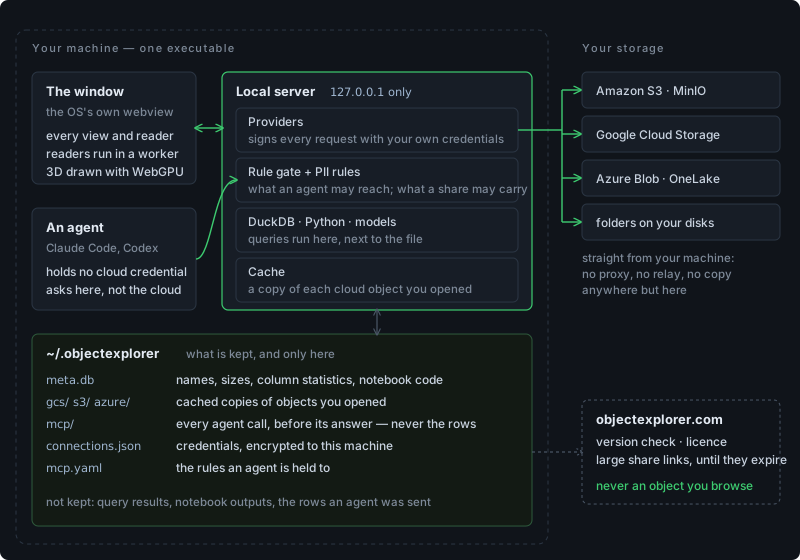
The pieces
| One executable | the desktop app is a single native binary: the operating system's own webview and a Node server, packed together. npx runs the same server and opens your browser instead. No Electron, no Chromium |
| The window | every view: the tree, the list, the notebook, the PDF reader, the 3D views. Readers for file formats run in a worker, so a big parquet or a CAD part never freezes the window; 3D is drawn with WebGPU |
| The local server | listens on 127.0.0.1 and ::1 only, so nothing else on your network can reach it. Everything that touches storage, credentials or the disk happens here |
| Providers | one per kind of storage: S3 and S3-compatible, Cloud Storage, Azure Blob, OneLake, local folders. Each signs its requests with the credentials you connected and sends them straight to the provider |
| Query engines | DuckDB runs SQL next to the file, Python cells run in environments uv made on this machine, and models train in WebAssembly in the window |
| The rule gate | every call an agent makes passes it: which roots it may reach, what is denied everywhere, what needs your approval, how much it may take |
| PII rules | one set of rules, written once, applied to what an agent is sent and to what a share link carries — see PII rules |
| The cache | a copy of each cloud object you opened, so the second look costs nothing — see the cache |
Opening a file
- You click a file. The window asks the local server for it.
- For a local file, the server reads it from your disk. For a cloud object, it looks in the cache; a copy younger than a day, with the same size the cloud reports, answers. Otherwise it signs a request to the provider and writes the object into the cache as it passes through.
- The window hands the bytes to a reader in a worker, which works out what the file is, from its name and, when the name is not enough, from its first bytes.
- The view draws it. Nothing about the file's contents goes anywhere else.
A very large text file is read in windows rather than whole, so the page only ever holds what is on screen. For a cloud object, though, the cache still fetches the whole object once before it answers the first window.
An agent's call
- Claude Code, Codex or another MCP client on this machine calls
http://localhost:<port>/api/mcpwith the token from Settings → MCP. It holds no cloud credential. - The rule gate decides: is this tool allowed, is the path in a ticked root, does a deny rule match, does it need your approval, is it inside the limits.
- The call is written to the session's log before the answer goes back, allowed or denied.
- The server reads the object the same way the window does, runs the query if there is one, and passes every row through the PII rules.
- The answer goes back to the agent. If Observe is on, the window opens the same object.
What is saved
Everything the app keeps is in ~/.objectexplorer — the full list is in where your data lives.
| Kept | Where | Holds your data? |
|---|---|---|
| The tree of what you have browsed | meta.db | names, sizes, dates, storage classes — not contents |
| Column statistics | meta.db | yes, in part: counts, min, max, quartiles and each column's most common values |
| Notebooks | meta.db | the code of each cell, never its results |
| Renames | meta.db | the old name and the new one, so Quick Open finds a file by either |
| Cached copies of cloud objects | gcs/ s3/ azure/… | yes: whole objects you opened, up to the limit you set (100 GB by default), oldest dropped first |
| Files converted for SQL | duckdb/ | yes: a parquet copy of a SAS, SPSS or spreadsheet file you queried |
| Every agent call | mcp/<agent>/ | the tool, the path, the decision, the size of the answer — never the rows |
| Credentials you typed or dropped in | connections.json | encrypted with a key tied to this machine |
| The rules an agent is held to | mcp.yaml | your rules, including PII rules |
| The key PII rules hash and encrypt with | mcp/key | a secret; it never leaves the machine |
| Python environments | venvs/ | what you installed into them |
| PDF notes, a grid's layout, a view mode | the webview's storage | your notes; the rest is layout |
Two things are written outside that folder, into the storage you browse, and only these:
- A delete moves the object into a
.trashfolder beside it, kept for 30 days, so it can be undone. - A search of a local folder writes an index,
.index.bin, into that folder: the words it found in each file and their scores, so the next search only reads what changed. A search of a cloud prefix keeps its index in the cache instead.
And of course anything you do on purpose: a copy, a move, a rename, a file you save.
What is not saved
- Query results. A notebook stores its code; the rows come back when a cell runs again.
- What an agent was sent. The log says what was asked and how much came back, not the rows.
- Anything on a server of ours. There is no account and no upload. The only calls to objectexplorer.com are the version check, your licence, and a share link too big to fit in its own URL — the full list is in your data stays here.
Deleting it all
Quit the app and remove ~/.objectexplorer. The next start is a fresh install. Your storage is not touched, except for the .trash and .index.bin files above, which are yours to delete too.
Next: getting started.