 ObjectExplorer
 The cache
A cloud object you open is downloaded once and kept on this machine. The next time anything reads it — a preview, a query, an agent — the copy answers, and the provider is not asked for the bytes again.
The copies live under ~/.objectexplorer, one folder per provider — see where your data lives. Nothing is ever written into the bucket.
How much it may take
Settings → Cache draws one bar against the whole disk: what the copies use, and the limit they are held to. Drag the handle to move the limit, in whole gigabytes. It starts at 100 GB.
The limit is kept. Past it, the copies nobody has read for the longest go first — judged by when each one was last read, not when it was downloaded.
Under the bar, what each provider's copies take, how many reads the copies answered, and the egress those reads would have cost. Clear Cache deletes every copy, after asking; each is downloaded again the next time it is read. Your roots, the object tree and everything else the app remembers stay.
What it saved
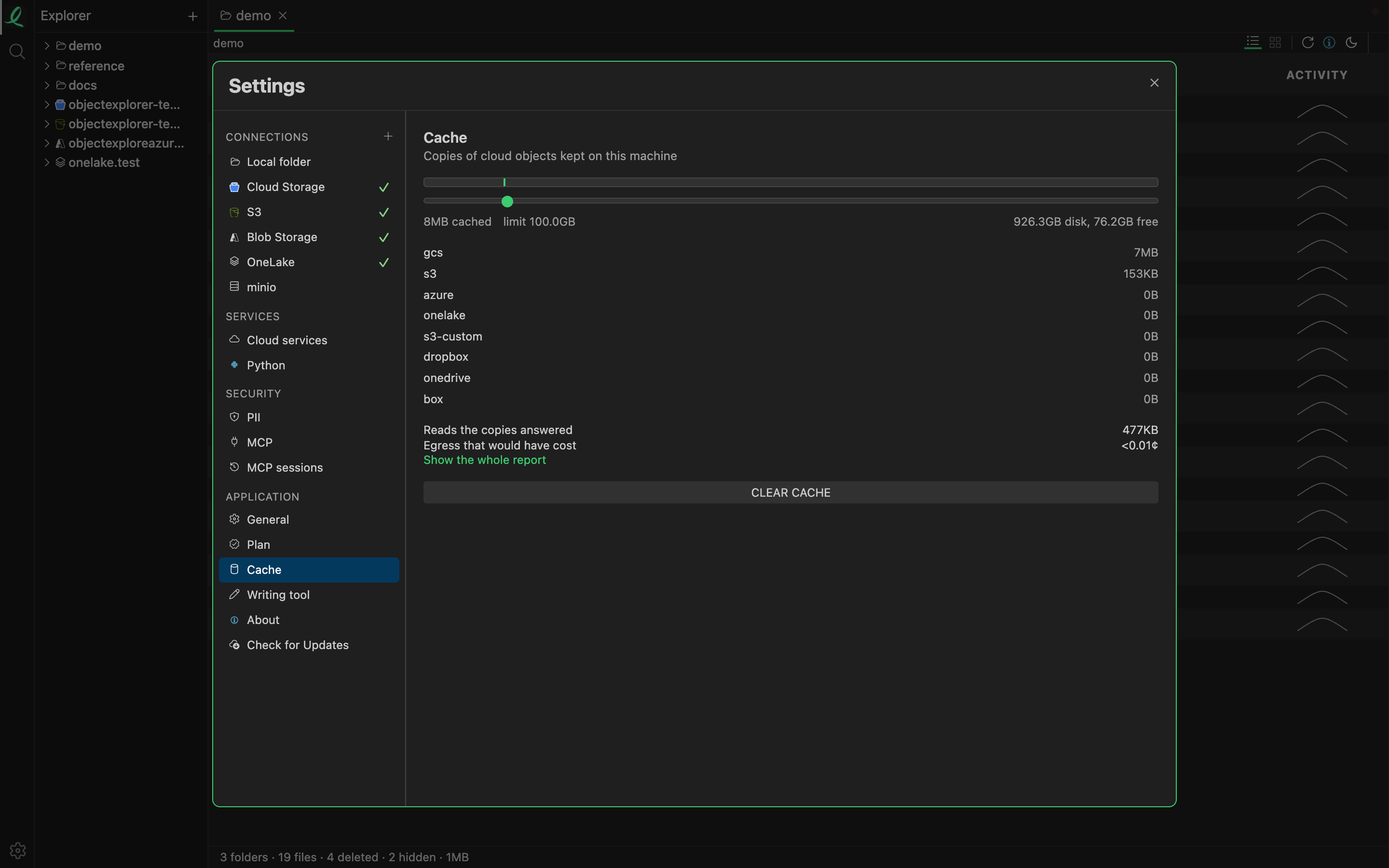
Show the whole report, in the same pane, opens it as a tab — one row per bucket, and a total:
| Column | What it says |
|---|---|
| Objects | how many objects of this bucket have been read |
| Reads | how many times they were read |
| From cloud | how many of those reads went to the provider |
| Pulled | the bytes those downloads moved |
| On disk | the bytes held here now |
| Avoided | the bytes the copies answered instead of the cloud |
| Saved | the avoided bytes, priced at the provider's first tier of egress |
Saved is an estimate of the right order, not a bill. The first read of anything is counted as a download, so an object read once has saved nothing, and one nobody has read is not on the list.
A copy spares the bytes every time, and the request only sometimes: every read still asks the provider for the object's own facts, and that answer is good for five minutes. So a read an hour later still costs one request, and the report counts the two apart.
The same savings are one of the heights on the usage disc.
Next: previewing an object.