 ObjectExplorer
 Where the usage numbers come from
The usage disc shows money, age, attention and duplication for every root you have added. None of it is fetched to draw the picture and none of it is guessed. This page says which record each number is read out of, and what the disc cannot tell you.
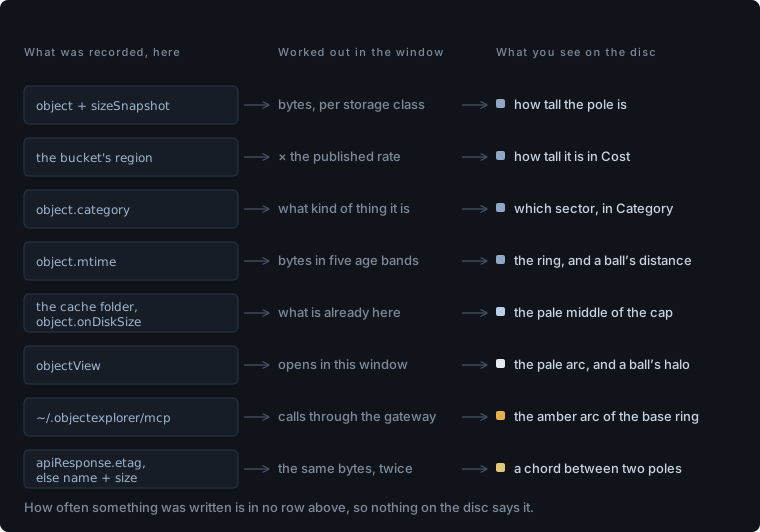
The two halves
The database records facts and never prices. The window holds the rate tables and works out the money. That split is deliberate and it runs through the whole app — the cost column, the cache report and the disc all price the same bytes the same way, and a database copied to another machine is a record of what was seen, not of what it was worth.
So the server answers with bytes per storage class, counts, ages, reads and pairs. The window multiplies them by the published rate for that bucket's region.
Every number, and its source
| On the disc | Read from | Note |
|---|---|---|
| Size | the newest sizeSnapshot of every object under the pole | what the provider last reported, not a fresh listing |
| Objects, and the width of the cap | the same rows, counted | folders are not objects and are not counted |
| Storage class split | object.storageClass | an object that never carried one is priced at the bucket's default |
| Cost per month | those bytes × the published rate for the bucket's region | see below |
| Which sector | object.category, worked out from the file extension when the row is written | the path is never read: a logs/ folder of screenshots is screenshots, and gzipped logs are archives |
| Age bands | object.mtime, in five buckets: under 30 days, 30–90, 90 days to a year, one to two years, over two | an object whose provider gave no modified time falls back to when this app first saw it |
| A grey ball | the same ages, at 365 days | a ball's distance from its pole is its age too |
| The six balls | the three largest objects under the pole changed inside a year, and the three largest that have not | their paths are walked up from the tree on demand |
| How often a ball was opened | that object's own rows in objectView, plus the gateway's calls naming it | on the ball's card, not drawn on the ball |
| Pale top of the stack | the size of the cached copies on this disk, per root and category; object.onDiskSize for a synced folder | a cloud root's is measured by walking the cache folder, which is its only index |
| The ring on the cap | how many reads the pole has had, drawn as an area on the same scale as the cap | a ring the size of its cap is about one read per object |
| Pale arc of the base | objectView — one row per object you opened in this window | written by the window's own heartbeat and by nothing else |
| Dark arc of the base | the agent gateway's log in ~/.objectexplorer/mcp | one line per call, matched back to an object by the URI the agent used |
| Thickness of the base | bytes those reads moved, from objectAccess, against the busiest pole on the disc | one figure for the pole, not split between person and agent — see below |
| An arch between two poles | the same bytes found in both | matched by apiResponse.etag where both sides have one, otherwise by name and size |
| Saved, on the card | three terms, below |
How a cost is worked out
For each storage class in a pole, the bytes in that class are multiplied by the published rate for the bucket's region. Where a class bills a minimum per object — S3's Standard-IA, One Zone-IA and Glacier Instant Retrieval bill every object as at least 128 KiB, Glacier Flexible Retrieval and Deep Archive as at least 40 KiB, and Cloud Storage's Nearline, Coldline and Archive as at least 128 KiB — the pole is priced at whichever is larger: the bytes it holds, or that minimum once per object. A bucket of two million tiny objects in a cold class costs what two million minimums cost, whatever the bytes add up to.
A bucket's region comes from the last listing of that provider. It is kept, so the disc still prices correctly when you are signed out or offline: an empty answer from a provider is treated as "could not see them", not as "they are gone", and never erases what was already known.
A local folder has no published rate and is never given one. Its cost reads —.
Every price is the provider's list price for storage. Requests, retrievals, replication and cross-region transfer are not in it, so read a pole as the storage line of a bill rather than the bill.
How "saved" is worked out
Three terms, kept apart on the card because they answer different questions:
| Term | What it is | Where it comes from |
|---|---|---|
| The egress the local copies spared | reads the local copy answered × the object's size, at the provider's egress rate | objectAccess, the same arithmetic the cache report uses |
| What no cloud is charging rent on | bytes that live only on this machine, priced as if they were in a cloud | the cache walk and object.onDiskSize |
| Less the egress already paid | what pulling those copies down cost in the first place | objectAccess, the rows whose source is the provider |
A bucket's bytes are billed where they are, so the middle term is zero for it: a local copy saves the download, not the rent. A folder on this disk is the other way round, and pricing it needs a rate it does not have — so exactly one is borrowed, S3 Standard in us-east-1, and the card names it every time it is used. Nothing else in the app invents a rate.
The terms are not charged the same way: egress is paid once when the bytes move, storage every month they sit there. The card labels each line rather than folding them into one number and hoping.
What it cannot tell you
Nothing about writes. There is no record anywhere of how often an object has been written or changed — no write count, no version history. object.mtime is the provider's word for when it last changed, and that is all. No mark on the disc stands for writing, and none ever will unless something starts recording it.
Only what has been listed. The disc is drawn from the objects this window has already seen. A bucket you added and never opened has no pole — it has a bare post, which is the honest answer. Open it once and it joins the disc.
Only as fresh as the last listing. Cloud listings are cached for eight hours. Something written to a bucket since then is not on the disc until the folder is listed again.
A person's reading, not everybody's. objectView counts opens in this window on this machine. A colleague reading the same bucket from theirs leaves no mark here.
An agent's calls, not its bytes. The gateway records what each call asked for and how much it answered with, so the two arcs of the base are told apart by its own log. The bytes a read moved are recorded wherever they were served, by the window and the gateway alike, so the base's thickness is one figure for the pole and is never split between the two.
Duplicates are a floor, not a total. Nothing under a megabyte is compared, a name held more than sixty-four times is treated as a naming convention rather than a finding, and only the two dozen biggest pairs are drawn. And the two ways of matching are not equal: a provider's tag is only kept for objects whose metadata this app happened to fetch, so most pairs are found by name and size — which is a real answer with a real chance of coincidence. Every row says which one it used.
Six objects, not the tail. A pole draws six objects as balls, every one a real object that can be clicked and named. The rest of what it holds is not drawn one by one; its ages are the bars on the card.
Where the records live
Everything the disc reads is on this machine, in ~/.objectexplorer:
meta.db | the objects, their sizes, ages, classes, categories, the opens and the reads |
| provider folders | the cached copies, whose size on disk is the pale top of a stack |
mcp/ | one file per agent session, which is the dark arc of a base |
None of it is sent anywhere. See where your data lives.
Next: the MCP rule file.