 ObjectExplorer
 Column summaries
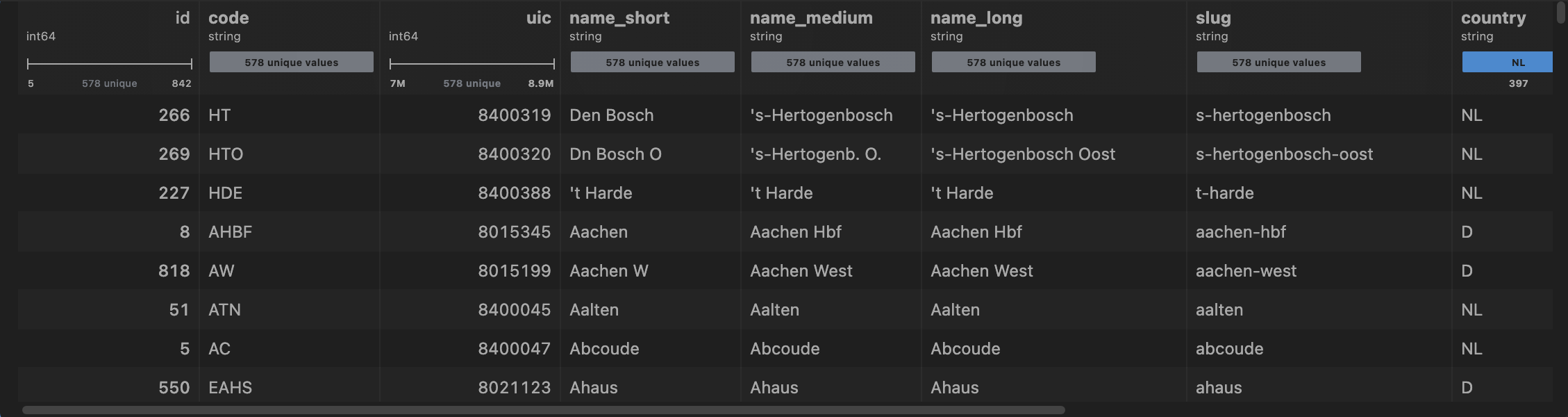
Open a table and every column comes with its own shape: a histogram for numbers, a box plot for distributions, a split bar for categories, a unique count for identifiers, the range underneath. It answers "is this the file I want?" without a line of pandas — computed locally, from the rows the grid holds, after the first rows are already on screen.
| Column | What is drawn |
|---|---|
| Decimals, or whole numbers with many values | a box plot: minimum, quartiles, median and maximum |
| Whole numbers with up to 60 distinct values | a histogram |
| Whole numbers that are nearly all distinct | the range from minimum to maximum, and the distinct count — an identifier |
| Text, and whole numbers with 12 values or fewer | a split bar of the commonest values, and how many are left |
| Text where every value is different | the count of distinct values |
| Date | a histogram over the years |
| Boolean | the true/false split |
Which one a column gets is decided from a sample of its values, so a date written as text, starting YYYY-MM-DD, draws as a date. A long text file's grid reads its first thousand rows for this.
The same summaries are what a chart cell reads to decide which plots the columns can support, and to put an identifier last.
Works on every grid: Parquet, CSV, TSV, JSON, JSONL, Arrow, ORC, Avro, xlsx, SPSS .sav, SAS .xpt / .sas7bdat, HDF5 and NetCDF, and the result of any query.
Next: search.