 ObjectExplorer
 Claude in the side bar
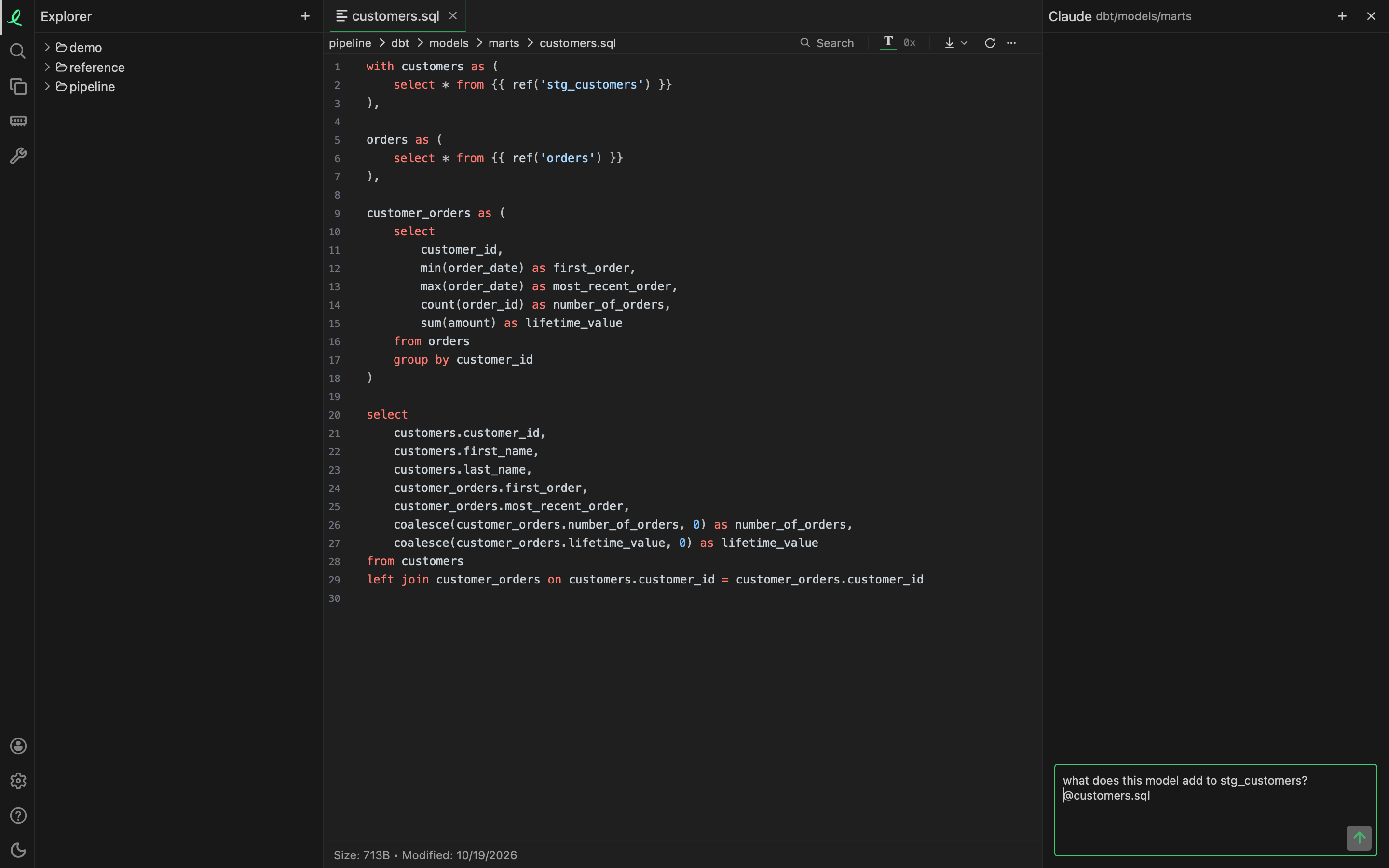
Right-click a file or a folder in the tree and pick Ask Claude…. A side bar opens right of the panes with Claude Code running in that folder — the file's own folder for a file — and the input starting with the file's name. Type what you want to know and press Enter.
It is your own claude: the command line you installed, signed in as you, with your settings. ObjectExplorer starts it and shows the conversation; it does not answer for it. The item is in the menu when the app finds claude on this machine, and only for files and folders on this machine.
What it may do
On a folder you ask about, Claude reads the files and changes none of them; the side bar says so under its header. What it asks to be allowed waits as a card above the input: Allow, Always Allow (kept in your Claude settings), or Deny with what to do instead typed in it. A question Claude asks shows its options, and a plan shows Approve or Keep Planning.
The conversation
Each step is on a line down the left: what you asked, Claude's answer, each tool with what it was given and what it answered. While Claude runs helpers of its own, their count is in the header and each one is a row you can open.
- Enter sends, also while Claude is still working — it answers that next. Shift+Enter is a new line, and ↑ and ↓ bring back what you asked before.
- The stop icon stops the answer; + starts a new conversation; the ✕ or Escape closes the side bar. A click elsewhere never closes it, so the conversation stays in view.
- While it is open, a file's or folder's menu has Append to Claude Session, which adds that entry to the same conversation.
- Once an answer ends, a file Claude edited is shown again as it is now.
- In the page
objectexplorerserves, the pop-out icon moves the side bar to a browser tab of its own, the whole width, still following the same conversation.
Lines of a text file, or any selected text
Right-click lines in a text file and Ask Claude… opens the side bar on those lines and the five before and after them. Select text anywhere the app has no menu of its own, right-click, and Ask Claude… does the same for that text. Both are a chat: Claude answers from the text it was given, with no tool and nothing else read.
Other assistants
Settings → Ask says who answers. Claude Code, ChatGPT (through codex exec), Gemini (through gemini -p), Ollama and llama.cpp are each a tick, ticked at the start when the app finds them; a command line not on your PATH can be picked with Locate…. Add takes the name and URL of any OpenAI-compatible endpoint, with its API key kept in the system keychain, never in the settings or a log, and a model picked from the ones it lists.
With one or two ticked, a file's menu has an item each — Ask Claude…, Ask Gemini…. With three or more it has one Ask…, which opens a ring to pick from. Every one answers in the same side bar.
What each one gets differs. Claude, ChatGPT and Gemini work in the folder you ask about, and may read its files and send what they read to their company's servers. Ollama, llama.cpp and an endpoint you added are sent the file's first 64 KB, or a folder's names.
This is your data going to the assistant you picked, so the PII rules are not applied. They are for what leaves this machine for someone else: an agent over MCP, the oe command line, a share.
The side bar is in the desktop app and in the page objectexplorer serves on your machine, not in the instant page at objectexplorer.com/app.
Duplicated code
The Code Duplication activity in the bar on the left finds the same block of code in more than one place: CSS, JavaScript, JSX and C. A folder's menu has Find Code Duplication, and the panel has Find in All Folders. Above the results: the files to include (*.css at first), remote storage to search in full, files to exclude with Use Ignore Files, and a slider for the fewest lines a block must have.
Each block is listed with its copies by file and line. A click opens that copy at its first line. Right-click a block for Ask Claude to Refactor… or Ask Claude to Merge…: the side bar opens with the copies and where each is used, and Claude may change the files in the copies' folder.
References, in a text file's toolbar, lists under the caret's line where the code there is used, in the files of the same folder: a CSS rule's classes and ids in HTML, JavaScript and JSX, and a JavaScript, JSX or C name wherever it appears.
Next: every format.