 ObjectExplorer
 Airflow and dbt pipelines
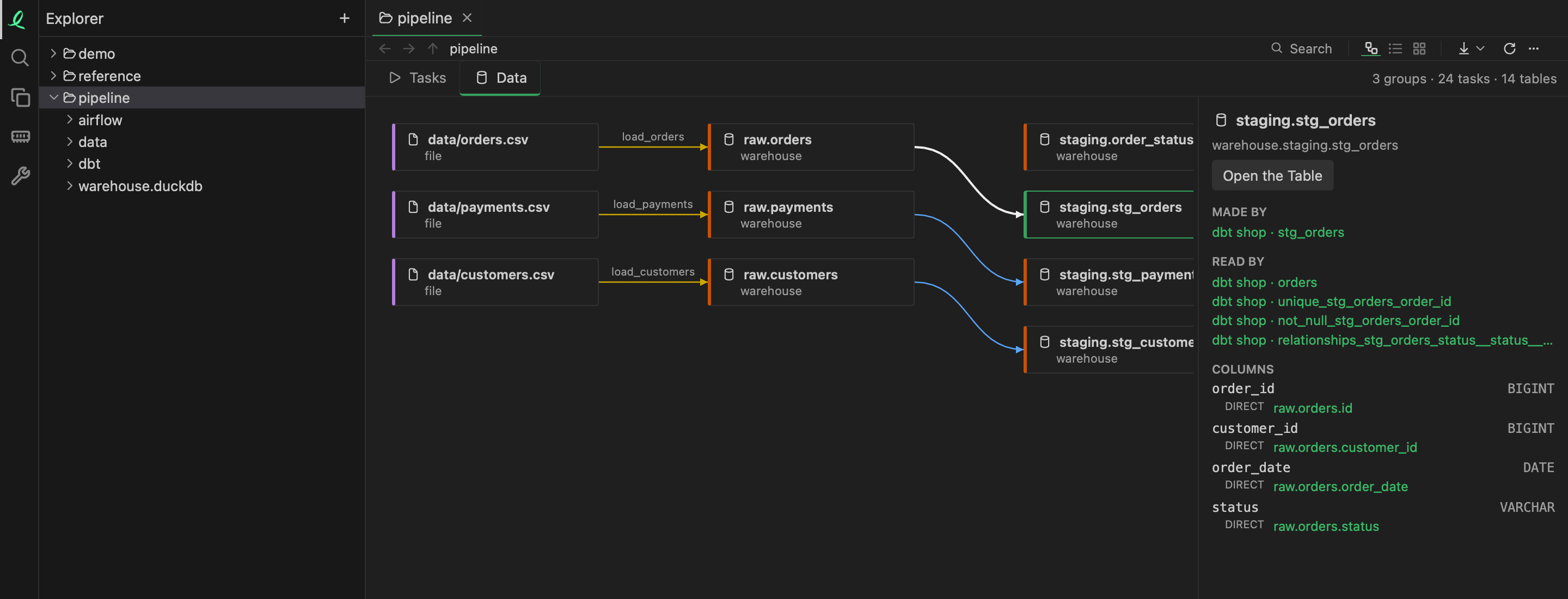
A folder holding Airflow DAGs or a dbt project opens as one Pipeline graph: every DAG and every dbt model in it, joined where one writes a table the other reads. A table is matched across the tools by its database, schema and name, so a load task in Airflow and the dbt model over its table are one line in the graph, not two pictures.
A folder counts as a pipeline when it is a dbt project (dbt_project.yml), an Airflow project (airflow.cfg, airflow_settings.yaml or a dags/ folder), a dags/ folder itself, or holds one of those. A single DAG file opens as the pipeline of the project around it.
Read, never run
A DAG file is Python, and it is read as text — never imported, never run — so opening a project cannot start a task or touch a database. The task ids and the edges between them come out as Airflow's own. Each task's SQL is read with the app's own SQL reader to find the tables it reads and writes.
When Airflow's own database is in the project (an airflow.db), it is read too, for what only Airflow knows: DAGs a factory made in code, how many instances a mapped task had, the SQL and commands as they were rendered, and each task's last state.
dbt models are rendered the way dbt compile renders them, macros included, without a warehouse. What a macro asks the warehouse — a table's columns behind dbt_utils.star, whether a model is_incremental() — is answered from dbt's catalog.json, or from the warehouse file the profile names (DuckDB or SQLite), and the answer says where it came from. An incremental model shows its SQL both ways. What only a real run could know is marked as such, never guessed.
Two views
Tasks and Data are a toggle apart above the graph.
- Tasks — what runs before what, grouped by DAG or dbt project.
- Data — which table feeds which, each edge labelled with the task that moves the data.
A folder opens on the data view; a DAG file on the task view, its DAG's tasks selected. The line above the graph counts the groups, tasks and tables.
A node beside the graph
Click a node and it is shown on the right; double-click to open it.
- A task: its SQL — a dbt model's as compiled — and the tables it reads and writes. Opening it shows its file at its line.
- A table: the tasks that make it and read it, and its columns. Each column lists the upstream columns it comes from, marked direct, derived or aggregated, through CTEs, joins and
select *; a click on one moves to that table.
Open the Table shows the rows. A table in a DuckDB or SQLite file opens in the other pane. A Postgres table shows its columns and first 100 rows beside the graph, over a read-only connection: you sign in once, and the credentials stay in the system keychain.
Next: Cloud Logging.