 ObjectExplorer
 Certificates and keys
pem crt cer der csr p7b p7c p7s p7m p12 pfx, and Java's jks jcekskeystore
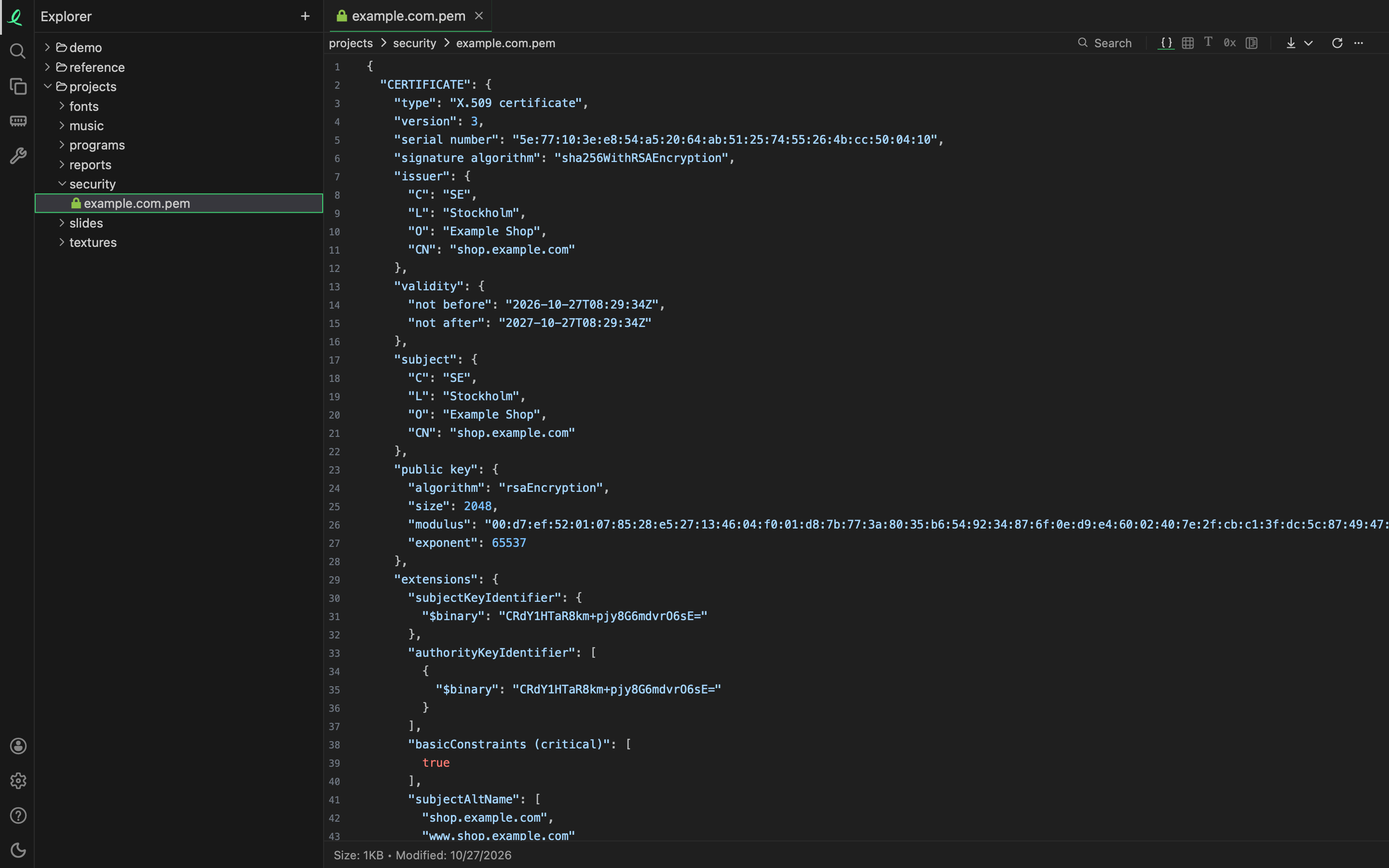
A certificate opens as its fields, named — not as a block of base64 to paste into openssl. The issuer and the subject, the dates it is valid between, the public key with its algorithm and size, and each extension by its name: subjectAltName, basicConstraints, keyUsage spelled out as words, (critical) beside the ones that are. Algorithms and object identifiers are given their usual names; one the app does not know shows as its dotted number.
| File | What it shows |
|---|---|
a certificate, pem crt cer der | the X.509 fields above |
a certificate request, csr | the subject, the public key, the attributes and the signature |
| a private key | its type, size and numbers — RSA, EC or PKCS #8 |
PKCS #7 and CMS, p7b p7c p7s p7m | the certificates it carries in full, and each signer |
PKCS #12, p12 pfx | how the store is put together, and its integrity check |
a Java keystore, jks jceks keystore | each entry by its alias and date, with its certificate chain |
A PEM file that holds several blocks — a chain, or a certificate and its key — shows each one in turn, under its label. A .crt or .cer is read whether it is PEM or binary DER: the first bytes decide, not the name.
The fields open laid out as JSON, folding like a JSON file. The table mode lists them as keys and values, and structure mode shows where each one sits in the file's bytes.
Nothing is decrypted and nothing asks for a password: an encrypted key, or the contents of a password-protected .p12, shows as its encryption and its encrypted bytes. Signatures and chains are shown, not checked.
WARNING
An unencrypted private key shows its secret numbers on screen, like any text editor would.
Next: programs and libraries.