 ObjectExplorer
 Download and Convert To
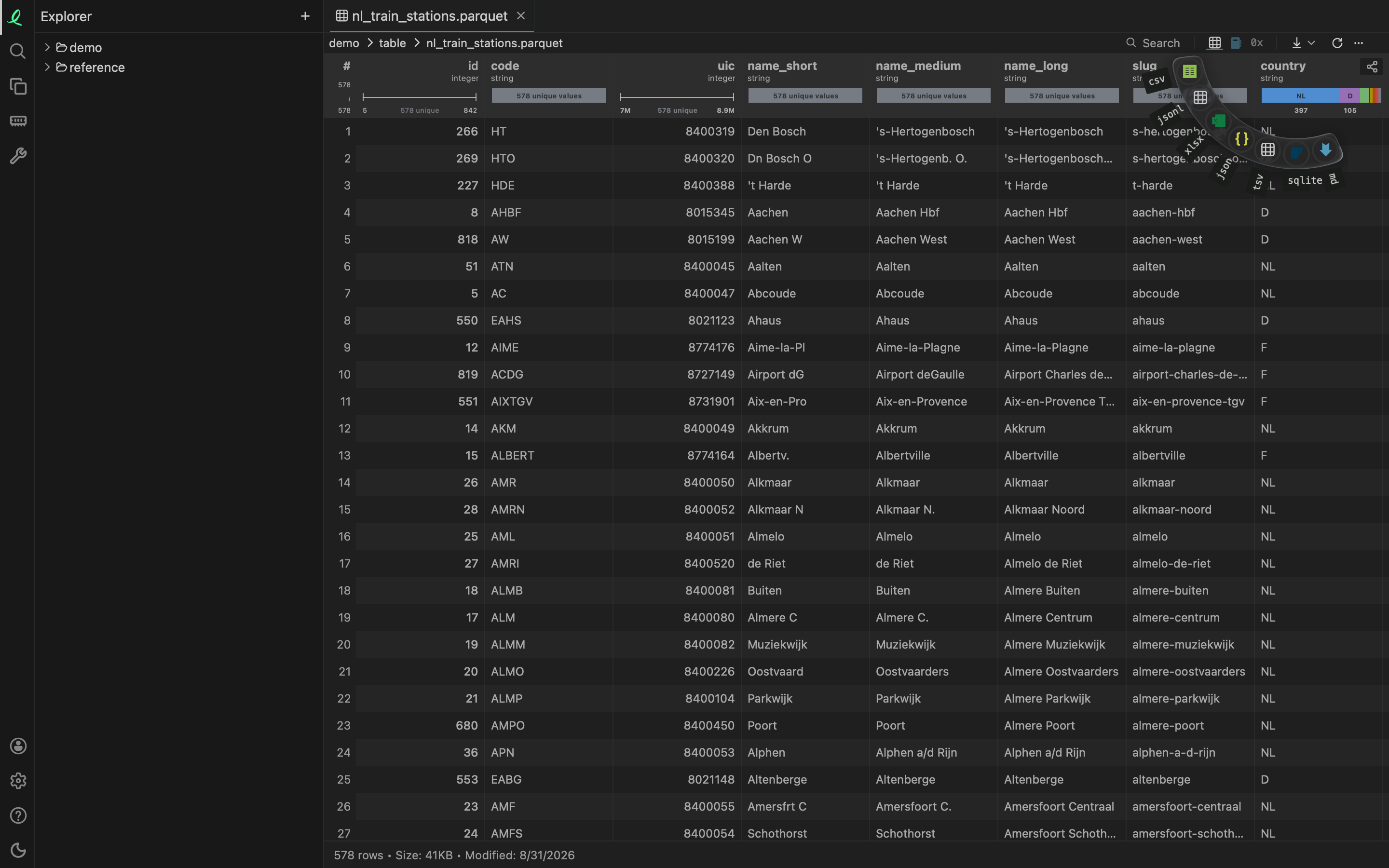
Every open file has a download button at the right of its toolbar, beside Refresh. It saves the file as it is, or written in another format: a table as an Excel workbook, a picture as a PNG, a Word document as Markdown, a folder as a zip.
Download
- The arrow saves what the tab shows as it is. A folder, or several files picked in the list or the grid, comes down as one zip.
- The ▾ beside it opens a ring of the other formats round the button. Holding the arrow down, a right-click on it,
→or⇧Enteropen the same ring; held, drag to a format and let go to pick it in one move.
The format under the pointer says what its file will keep: "Excel workbook (.xlsx): every row on one sheet", "JPEG picture (.jpg): the same pixels, slightly compressed, transparency on white". When it is done, the line at the foot of the pane says what was written, such as "Saved orders.xlsx in Downloads: 5 rows × 4 columns, the whole file".
The desktop app saves into your Downloads folder. A name already taken gets -1, -2 and so on added. In a browser, the server writes the file and your browser downloads it like any other.
A few things to know:
- A table is downloaded whole. A filter you set on the grid does not cut what is written; the format and the foot both say so.
- A workbook is read from its first sheet when it becomes another format.
- A table inside a SQLite or DuckDB database downloads as a table, CSV on a plain click, with every other table format in the ring.
- A file inside an archive or a database cannot be downloaded alone yet: download the archive or the database.
- Past 1 GB it asks first. Progress, and a way to cancel, are at the foot of the pane.
Convert To…
Convert To… in a file's right-click menu opens the same ring where the menu was. The new file is written beside the old one, photo.png becoming photo.jpg, or photo-1.jpg when that name is taken, and ⌘Z removes it again. The middle of the ring makes a plain copy in the same format.
A file inside an archive or a database is only read, so it cannot be converted where it is. The same Convert To… is in the Finder's and File Explorer's menu once you turn it on — see Finder, File Explorer and file managers.
What converts to what
The ring shows the formats a file's kind can be written as, most common first, up to eight. Its own format is left out.
| A file that is | Can become |
|---|---|
a picture: jpg png heic webp psd raw … | JPEG, PNG, WebP, GIF, PDF, TIFF, BMP, icon |
| an SVG drawing | PNG, JPEG, PDF, WebP, GIF, TIFF, BMP, icon |
a drawing: vsdx vsd odg emf wmf ps … | SVG, PNG, JPEG, PDF, WebP, GIF, TIFF, BMP |
a diagram: excalidraw drawio mmd | PNG, PDF, JPEG, WebP, GIF, TIFF, BMP |
a map: geojson topojson gpx kml kmz | GeoJSON, KML, GPX, SVG, PNG, PDF, JPEG, WebP |
| a shapefile | SVG, PNG, PDF, JPEG, WebP |
a table: csv parquet xlsx sav arrow h5 … | CSV, JSON lines, Excel, Parquet, JSON, TSV, SQLite, Markdown |
data: json yaml toml xml plist cbor … | JSON, YAML, XML, CSV, Excel, TOML, property list, MessagePack |
subtitles: srt vtt ass ttml lrc … | SRT, WebVTT, ASS, plain text, TTML, SAMI, LRC |
a document: docx doc odt rtf pages md … | Word, plain text, HTML, Markdown, OpenDocument, RTF, EPUB |
an ebook: epub mobi azw3 fb2 … | EPUB, Word, plain text, HTML, Markdown, OpenDocument, RTF |
a comic: cbz cbr cb7 cbt | PDF, CBZ |
| a Jupyter notebook | HTML, Python script, Markdown, plain text, Word |
slides: pptx ppt key odp … | PDF, PNG, JPEG, plain text, Markdown, HTML, Word |
| a PDF | Word, JPEG, PNG, plain text, HTML, Markdown, WebP |
a 3D model: glb fbx blend usdz step … | STL, OBJ, GLB, glTF, PLY, 3MF |
a sound: mp3 flac ogg m4a … | WAV, M4A (AAC), AIFF, WebM sound (Opus) |
a video: mp4 mov mkv webm avi … | MP4, MOV, WebM, M4A (the sound only), WAV (the sound only) |
a font: ttf otf woff woff2 eot … | TrueType, OpenType, WOFF, EOT |
| an archive, a folder, or several files | ZIP, gzipped tar, tar, the file list as CSV |
What each one keeps is said on the format before you pick it: a PDF turned into a picture is its first page, slides into a PDF are a page a slide, a model into STL is the shape without its colours, a document into Word keeps its headings, lists and tables but not its pictures.
A file of a kind not in the table downloads as it is.
Next: anonymized copies.