 ObjectExplorer
 Slide decks
.slides.md, and Markdown with Slidev front matter
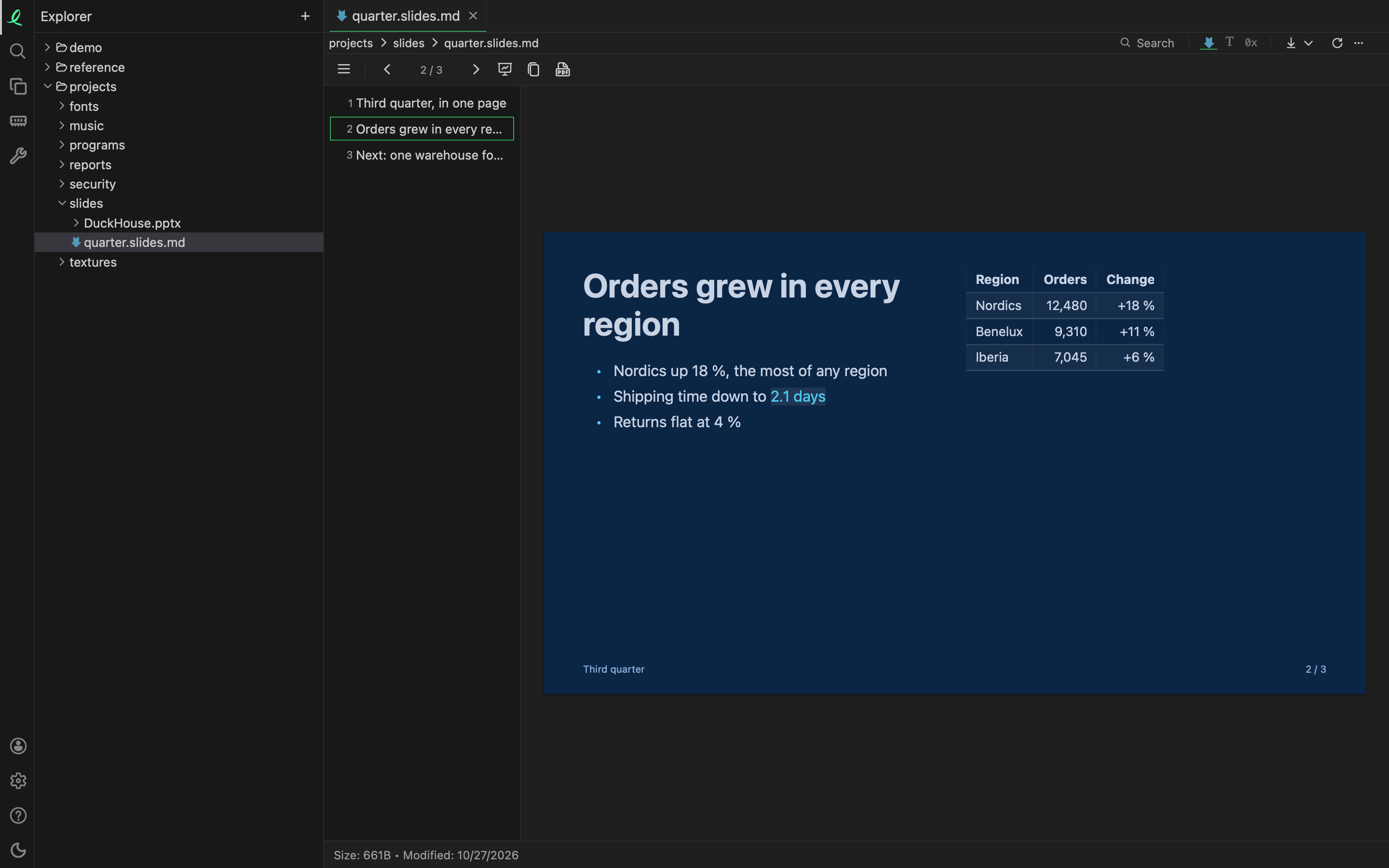
A deck is one Markdown file, and it opens as its slides: the slide titles down the side, the slide on show beside them, and its notes under it. A file is a deck when its name ends in .slides.md, or when its front matter has a deck setting such as theme, layout, colorSchema or aspectRatio — the way a Slidev deck starts. Any other Markdown file opens as a page.
Writing one
---
theme: ocean
title: Third quarter
---

# Third quarter, ==in one page==

<!-- Open with the one number people will remember. -->

---
layout: two-cols
---

# Orders grew in every region

- Shipping time down to <Popup label="2.1 days">from 3.4 days last quarter</Popup>

::right::

| Region  | Orders |
|---------|--------|
| Nordics | 12,480 |- A line of
---starts the next slide; the lines between two of them are that slide's settings. - Layouts:
cover,intro,section,center,two-cols,end,quote,factandstatement. The first slide is a cover unless it says otherwise; intwo-cols,::right::starts the right column. - Themes:
dark,light,sunflower,ember,meadow,oceananddusk— oryellow,orange,green,blue,purple. The front matter sets the deck's, and asectionslide with athemeof its own colours every slide up to the next section. ==words==are marked in the theme's accent colour.<!-- … -->is a note: left off the slide and shown under it.<Popup label="…">…</Popup>puts a word in the text that opens a box over the slide when it is clicked. A click elsewhere orEsccloses it.- Pictures (
, a path beside the deck), tables, code, and drawings: an```excalidrawor```mermaidblock is drawn in place. ```timeline(date | event),```stats(number | caption) and```cards(title | sentence) blocks lay out a row of dates, big numbers or cards.source:in a slide's settings puts its sources in the footer;logo:andlogoLink:in the deck's put a logo on the first and the last slide.
The deck's text mode is the Markdown itself, and in a local folder you can edit it there and save with ⌘S.
Moving through it
The arrow keys, PageUp PageDown, Space and Enter go back and forth; Home and End go to the first and the last slide. A click on a title in the side list goes to that slide.
Present shows the slides alone, full screen, one at a time; Esc leaves. While presenting, the pointer is a laser: press and drag anywhere on the slide and a trail follows it, then fades. A click on a popup word or a link still opens it.
Sharing it
| Button | What it does |
|---|---|
| Copy for LinkedIn and Medium | puts the deck on the clipboard as an article: each slide as a picture, its popups, notes and sources under it |
| Save as PDF | a page a slide, saved to your Downloads folder — ready for a LinkedIn document post |
Next: drawings and diagrams.