 ObjectExplorer
 Anonymized copies
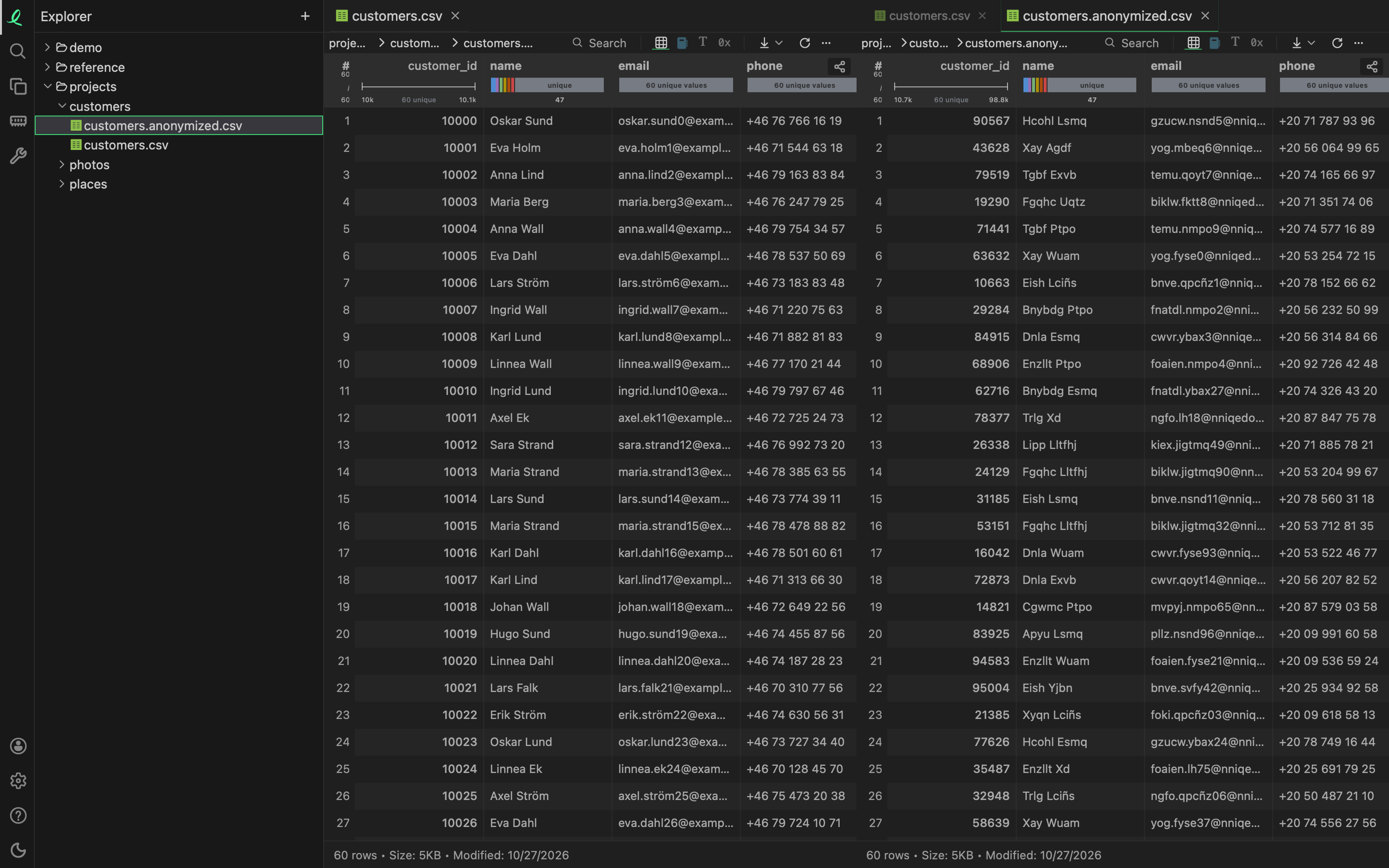
Sometimes a file has to leave your hands — for a colleague, a test, or a bug report — but the people in it must not. Create Anonymized Copy in a file's right-click menu writes <name>.anonymized.<ext> beside it and opens it. ⌘Z removes the copy again.
What changes
Every value is replaced by another of the same shape, so the copy opens the same way, in this app or any other, and the same queries still run on it.
- A text keeps its length and every character stays in its own alphabet: a capital stays a capital, a digit a digit, Cyrillic stays Cyrillic. Each word is changed on its own, and the same word becomes the same other word everywhere in the file, so a name still matches itself.
- A number keeps its sign, its width and its decimals, and stays a number.
- What gives the file its shape stays: column names and a header row, JSON keys, the order and layout,
true,falseandnull, and the dates a format marks as dates (in Excel, Parquet, Stata, SPSS and SAS files). A database keeps its schema, views, indexes and blobs.
The values are changed with a key made for that one copy and thrown away straight after, so nobody can turn them back — not even you.
One thing is not changed: statistics a format keeps beside its values. A Parquet file's minimum and maximum per column stay as they were, and they are real values. Check those before you hand over a Parquet copy.
Which files
CSV, TSV, PSV, JSON, JSON lines, Jupyter notebooks, YAML, XML, SQLite, Parquet, Excel (xlsx and xls), OpenDocument sheets, Arrow and Feather, Avro, NumPy (npy, npz), Stata, SPSS, SAS (xpt, sas7bdat), NetCDF, and a CSV or JSON file compressed with gzip or Zstandard. A Parquet file with nested columns (lists, maps, structs) is not supported.
The file has to be on this machine: download a cloud object first. The menu item shows only on the files it can do.
The same copy from a terminal:
oe anonymize customers.csv          # customers.anonymized.csv beside it
oe anonymize customers.csv out.csv
See the command line.
Sending a file to us
When a file does not open, or opens wrong, the file is what we need to see — and usually what you may not send. Share Anonymized for Debugging, in the same menu, makes the same anonymized copy and sends it to us instead of writing it. It is encrypted on your machine with our public key before it leaves, so only we can read it. A message then gives you the name it was stored under: quote it in your report.
Two commands in the command palette (⇧⌘P) send the rest of what helps:
- Help: Share Application Log for Debugging, in the desktop app, sends the end of the app's log, encrypted the same way. The log is not anonymized: it holds paths and messages, which is why we read it.
- Help: Report Bug with a Screenshot sends a picture of the window, a line on what went wrong if you like, the version and the end of the log.
Nothing of this is sent unless you choose it — see your data stays here.
Next: copy, move, rename, delete.