 ObjectExplorer
Agentic tasks
An agentic task is a piece of work you hand to an agent in your own repository: you say what you want in a few words, the agent researches it or builds it, and leaves a slide deck for you to review. You comment on the slides, send it back for another round, and accept or reject it. Every step is a file in the repository, so the task and what was decided are kept in git beside the work.
Making one
Right-click a file, a folder or a tab and pick Create Claude Task… (or the agent's name). With three or more agents ticked in Settings → Ask, there is one Create Agentic Task…, which opens a ring of them, as Ask… does. The agents offered are those that work in a folder and write its files: Claude, Gemini, Copilot, ChatGPT and a command line you added, not a chat endpoint.
The item is greyed outside a git repository: the task goes into the repository above what you right-clicked.
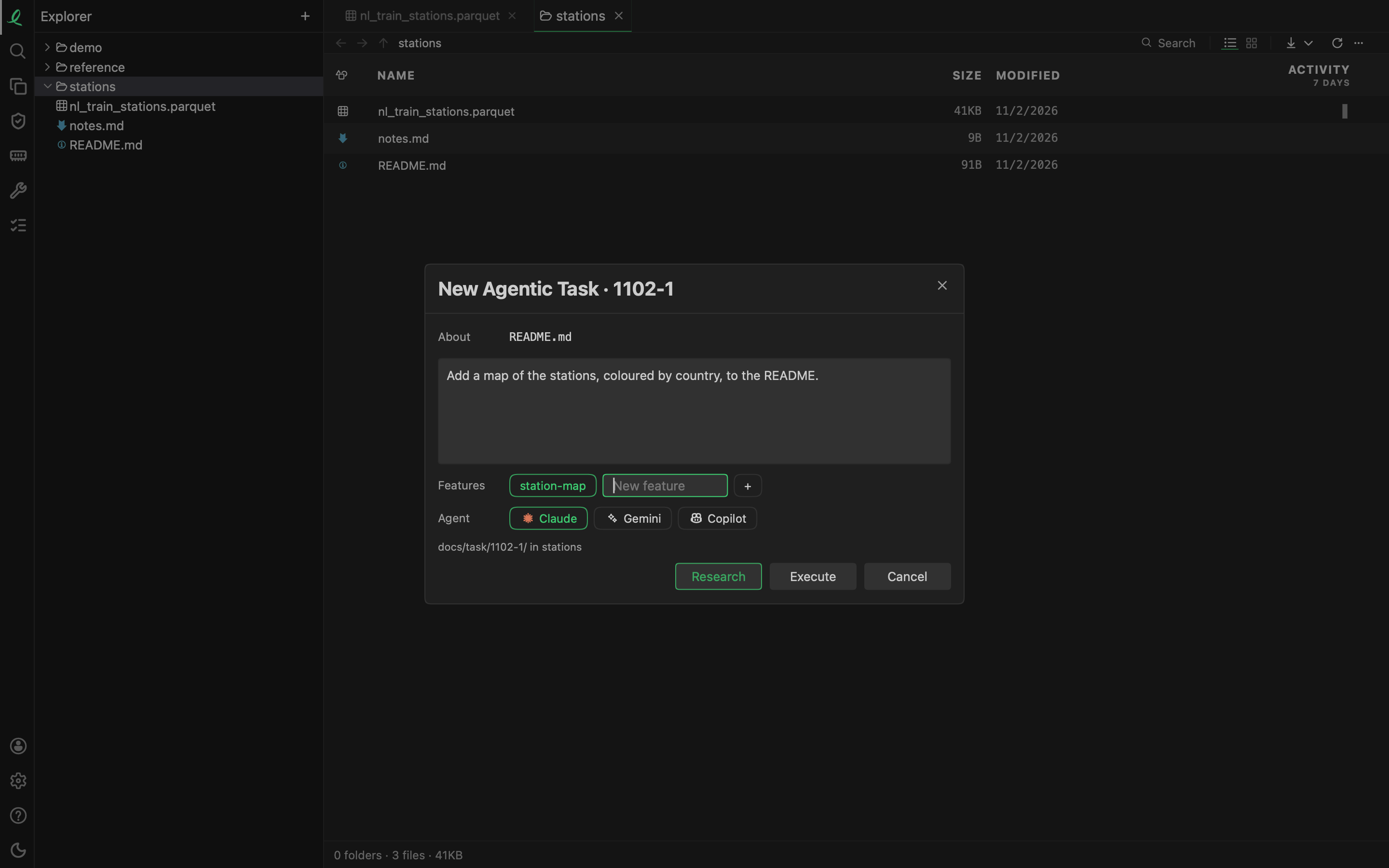
The New Agentic Task box has:
- About — what you right-clicked, as the agent will be told it;
- your words — what to do;
- Features — the parts of your project it belongs to, picked or typed as a new one;
- Agent — the one you picked in the menu, changeable here;
- where it goes:
docs/task/<name>/in the repository, the name today's month and day and the next free number,1102-1.
Then one of three buttons:
| Button | What the agent does |
|---|---|
| Research | writes its research and a review deck of how it would do it, changes no code, stops |
| Execute | builds it at once, commits, then writes a review deck of what it built |
| Cancel | nothing: the box closes |
The agent's conversation opens in the side bar, so you can watch it, answer its permission cards, or stop it.
The files
Everything lives in the task's own folder:
docs/task/1102-1/
  1102-1.md                  your words, never changed by the agent
  1102-1.research.md         the agent's research: what exists, decisions with a default, steps
  1102-1-map.slides.md       a review deck, <name>-<topic>.slides.md
  1102-1-map.comments.json   your comments on that deck
  review/                    its screenshots and pictures
docs/feature/station-map.md  a feature named in a task
The agent is told to read your repository's CLAUDE.md first, if there is one, and to follow its rules. Under each part of your task file it adds a short Cause and fix after research and a Solved line once it built it. When it builds, it commits its changes with messages that start with the task's name (1102-1: …).
A task stays in docs/task/ on the day of its name. From the next day on, the app moves its folder to docs/history/<month>/<name>/ the next time it lists the tasks, rewrites the links to it, and commits the move as one commit.
Reviewing
A review deck in a task's folder opens with its own buttons beside the slides' toolbar.
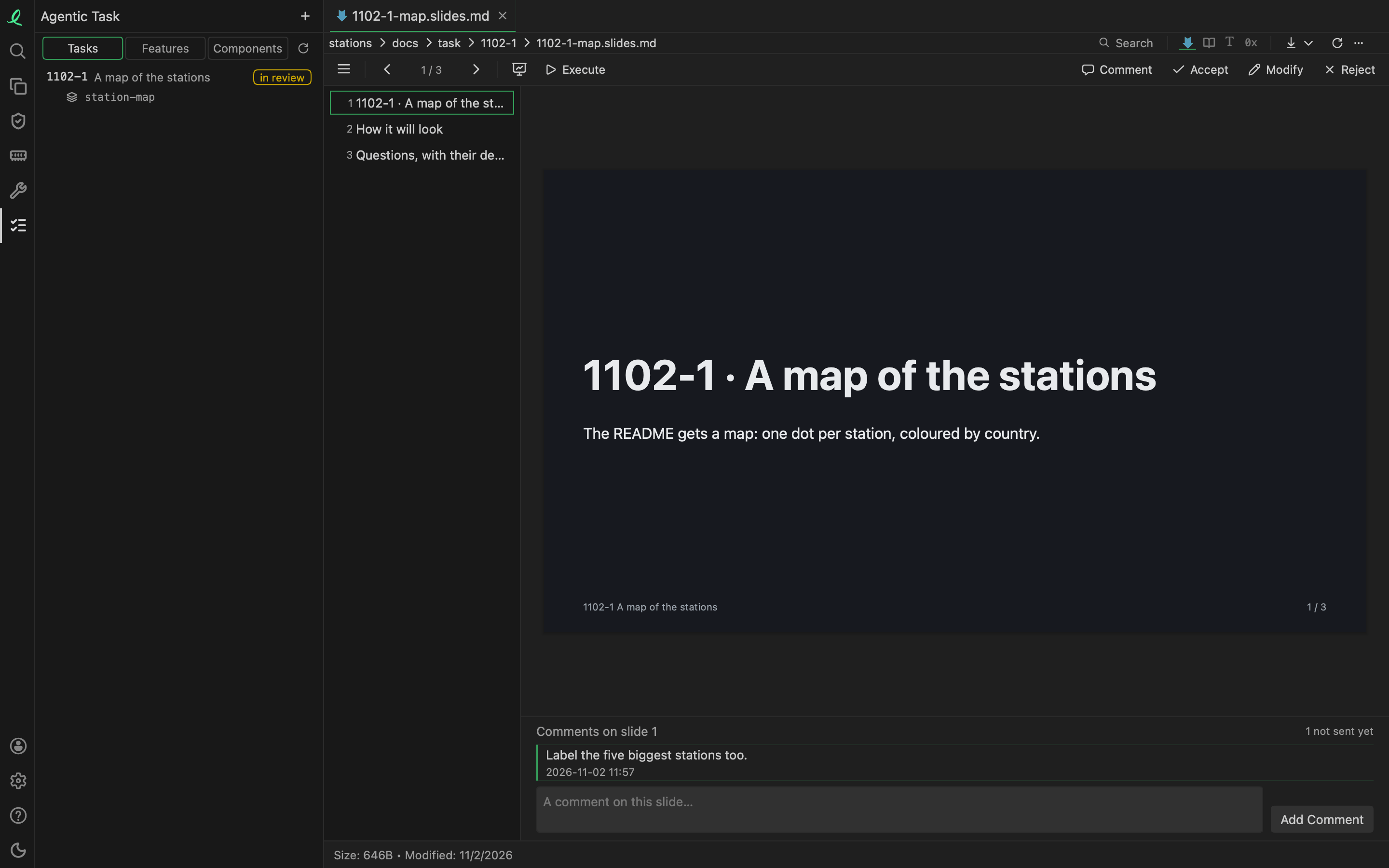
- Comment shows the comments on the slide in view and a box to add one (Add Comment). They are kept beside the deck, and each round sends the ones not sent yet.
- Execute, beside Present, sends the deck and its comments to the task's agent to build.
- Modify sends your comments and your own edits in the folder for another round: research again if the deck reviewed research, build again if it reviewed a build. A new review deck follows.
- Accept adds
Accepted (<date>).to the task file and commits the task's folder. - Reject asks why in a line or two, adds
Rejected (<date>): <why>to the task file and commits the folder. No file the agent changed is reverted: what to keep is yours to decide.
Each round is a new conversation with the task's agent: everything it needs is in the folder and in git.
The Agentic Task activity
The Agentic Task icon in the bar on the left lists the tasks of the repositories in your tree that hold docs/task or docs/history, a row of chips to pick one when there are several. A switch at the top shows three lists, each naming the other two:
- Tasks — each with its title, its state, its features, and the parts of the code its commits changed. A click opens its task file, research and review decks as tabs.
- Features — each with its tasks and its parts of the code, as bars of the lines changed. A feature with no file yet is greyed.
- Components — each part of the code with the lines changed, and the tasks and features that changed it.
A task's state is read from its files, never stored:
| State | When |
|---|---|
| open | the task file alone |
| researching | its agent is researching it in this window |
| building | its agent is building it in this window |
| in review | it has research or a review deck |
| done | its file has an Accepted line, or every part is Solved |
| rejected | its file has a Rejected line |
The parts of the code are measured from git: the commits whose message starts with a task's name, the files they changed (docs/ left out), and the lines changed, by folder.
Agentic tasks run on this machine only: in the desktop app, and in the page objectexplorer serves on your machine.
Next: every format.