 ObjectExplorer
Mail, chats and personal files
Outlook's pst ost and olm, Apple Mail's emlx, Safari's webarchive, chat exports from WhatsApp, Telegram, Messenger, Instagram and iMessage, a browser's history and bookmarks, Windows shortcuts lnk, registry hives and reg files, url and webloc links, and password exports
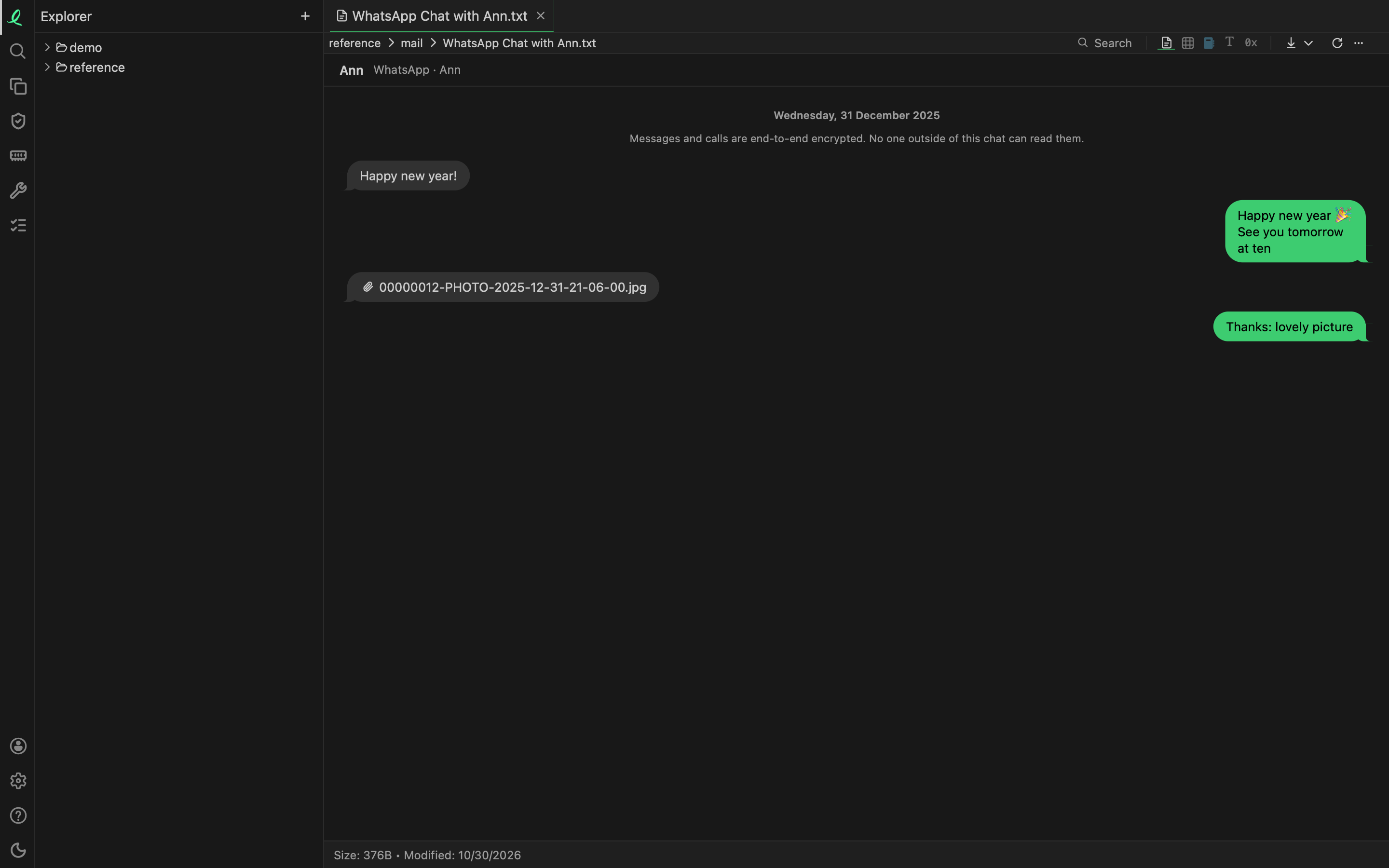
The files a computer or a phone keeps about you open as what they hold: a mailbox as its messages, a chat as its bubbles, a history as its visits. Most of these have no name of their own — History, places.sqlite, chat.db, result.json, _chat.txt — so which one a file is, its bytes decide.
Every one of them is read on your machine, like any other file — see your data stays here.
Outlook data files
pst ost olm
An Outlook data file (.pst, or .ost, the copy Outlook keeps of a mailbox on a server) and an Outlook for Mac archive (.olm) open on the table of their messages, a row each in folder order. Render shows the messages one after the other, each as an e-mail's page shows it, and the list of folders browses them like a folder tree, each message a file that opens as an e-mail with its attachments.
| Column | What it holds |
|---|---|
folder | the folder's path — Top of Outlook data file/Inbox |
date | when it was delivered, else sent, else created |
sender | who sent it — Ann <ann@example.com> |
to cc | who it went to |
subject | |
body | the text, or the words of the HTML body when there is no text |
attachments | how many it carries |
kind | the item's class — IPM.Note a message, IPM.Appointment a meeting |
message_id |
SELECT folder, count(*) FROM 'mail.pst' GROUP BY folderBoth of Outlook's file layouts are read, the older one of Outlook 97 to 2002 and the one since, and structure lays out how a .pst is put together. An .olm is read up to 200,000 messages.
Apple Mail and Safari
An Apple Mail message (.emlx) opens as an e-mail, the same way an .eml does: its header, its body and its attachments named. A page Safari saved whole (.webarchive) opens as the page, its pictures in place and every resource it holds listed as an attachment. Structure shows the property list each one carries.
Chats
| App | The export |
|---|---|
Export chat's text, _chat.txt or WhatsApp Chat with Ann.txt, or its .zip | |
| Telegram | Telegram Desktop's result.json: one chat, or the whole account |
| Messenger | Facebook's message_1.json |
| its messages' JSON, the same shape as Messenger's | |
| iMessage | the Mac's chat.db |
A chat opens as its bubbles, the way the phone showed them: your messages on the right, the others' on the left, the day over the first message of each day, and the app's own lines — "Messages and calls are end-to-end encrypted" — in the middle. In a group, the sender's name sits over the first of their messages. Hover a bubble for its time. An attachment is its file's name, or the photo itself when a WhatsApp .zip holds it.
An export of several conversations lists them on the left, newest first. A conversation opens at its end, its last 400 messages; Show 400 earlier messages goes further back.
The table holds every message: conversation, time, sender, text, attachment, outgoing and event, so a chat can be counted and searched with SQL. A chat.db's own tables are a path away: 'chat.db!/handle'.
A WhatsApp export carries no time zone, so its times are the ones the phone showed. Which side is yours comes from the file's name: in WhatsApp Chat with Ann.txt, Ann is the other side.
Browser history and bookmarks
A browser's history opens as a list of its tables, each a double click from opening; the same tables are read by SQL. Every time is a date and a time, whichever way the browser counts it.
| File | Tables |
|---|---|
Chrome's History | visits, urls, downloads, searches |
Firefox's places.sqlite | visits, places, bookmarks |
Safari's History.db | visits, items |
Chrome's Bookmarks | bookmarks |
a Firefox bookmark backup (.jsonlz4) | bookmarks |
any browser's exported bookmarks.html | bookmarks, with their folders, tags and descriptions |
Edge, Brave, Opera and Vivaldi keep the same History as Chrome. A visit says how you came to the page — a link, a typed address, a bookmark — and a download its state. Firefox's other compressed files (jsonlz4 mozlz4 baklz4: a session, the search engines) open as their JSON, laid out.
Windows files
| File | Opens as |
|---|---|
a shortcut lnk | its target, times, flags, arguments and working folder, as a tree |
| a registry hive | its keys as a tree, and a table of every value |
a registry export reg | its keys as a tree, and a table of every value |
an internet shortcut url, a Mac webloc | the link, to click, and the rest of what it says |
A hive is a file such as NTUSER.DAT, SYSTEM, SOFTWARE or Amcache.hve. Its table has a row per value: key, name, type, data and when the key was modified. Structure lays out a shortcut's and a hive's bytes.
Password files
A KeePass database (kdbx kdb), a Bitwarden export, a 1Password export (1pux) and a browser's saved logins open on a warning, never on their contents: what kind of file it is, how many items it holds of each kind, and whether it is encrypted. An export that is not says so in bold: "It is not encrypted: whoever reads this file reads every password in it."
Nothing is decrypted, no name, address or password is shown, and search leaves the file out. Its raw layout is in structure.
Next: Power BI.