 ObjectExplorer
Circuit boards and schematics
KiCad kicad_pcb kicad_sch, Altium PcbDoc SchDoc PcbLib SchLib PrjPcb, OrCAD dsnolb, Allegro brd dra, Eagle brd sch, CADSTAR cpa csa, PADS, EasyEDA, DipTrace, Fritzing fzz, gEDA, LTspice asc raw, and the files a board travels in: Gerber, Excellon drill, ODB++, IPC-2581, IPC-D-356, IDF and Specctra
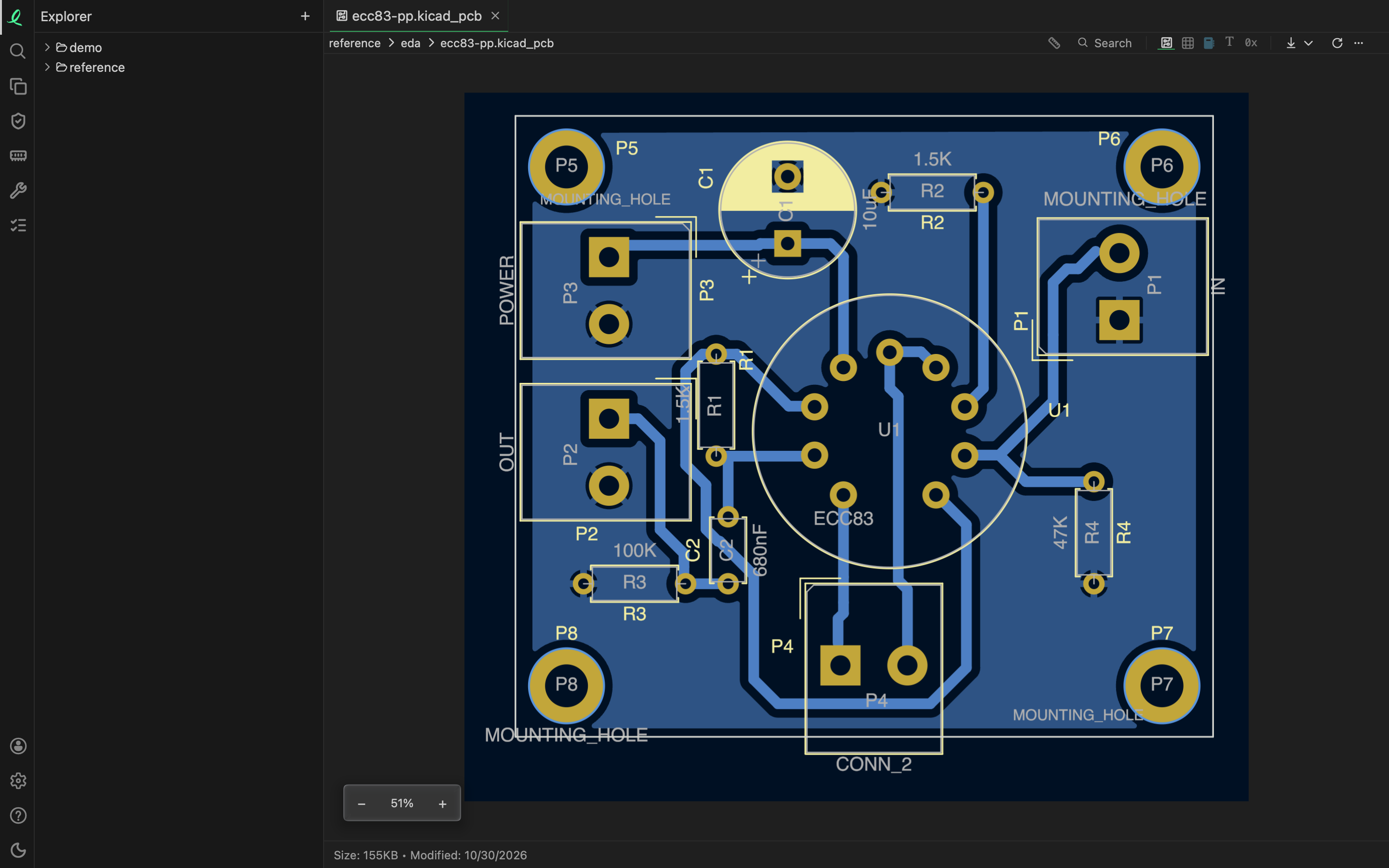
A board opens as the board, and a schematic as its sheet: drawn flat, fitted to the pane, the moment you open it. No design program is needed, and nothing is converted first.
Which tool wrote a file, its bytes decide, not its name: a .brd is Eagle's or Allegro's, a .sch Eagle's or gEDA's, a .asc an LTspice schematic, a PADS or a DipTrace export, and each opens as what it is.
What opens
| Tool | Files | What is drawn |
|---|---|---|
| KiCad | kicad_pcb, kicad_sch | the board, KiCad 4 to 10; the schematic, KiCad 6 on |
| Altium Designer | PcbDoc SchDoc PcbLib SchLib, PrjPcb | the board, the schematic, the footprints and symbols of a library |
| OrCAD Capture | dsn, olb, and their backups dbk obk | the design's pages, the library's symbols |
| Allegro | brd dra, and its text extracts alg fab | the board: tracks, vias, pads, shapes, outline, silkscreen and assembly |
| Eagle and Fusion 360 | brd, sch | the board; the schematic's first sheet |
| CADSTAR | cpa, csa, the archives its Export > Archive writes | the board; the schematic's first sheet |
| PADS | the ASCII exports of PADS Layout and PADS Logic (asc, txt) | the board, the schematic |
| EasyEDA | Standard's json, Pro's epro | the board or the schematic |
| DipTrace | its ASCII exports (asc) | the board, the schematic |
| Fritzing | fzz, fz | its breadboard, schematic and board views side by side |
| gEDA | PCB's pcb, gschem's sch | the board, the schematic |
| LTspice | a schematic asc; a simulation's results raw | the schematic; the results as signals |
| What a board travels in | Files | What is drawn |
|---|---|---|
| Gerber | gbr ger gtl gbl gto gbo gts gbs gtp gbp gko gm1 pho | one layer, in the colour of what it is (copper, mask, silkscreen) |
| Excellon drill files | drl xln drd | the holes |
| ODB++ | the job's .tgz or .zip, or its matrix/matrix in the job's folder | the first step, its copper, drill and silkscreen layers stacked |
| IPC-2581 | an .xml whose root is IPC-2581, cvg | the first step |
| IPC-D-356 netlists | ipc356 d356 356 | the test points |
| IDF | emn (the board), emp (its library, read beside it) | the outline, the holes, each part's outline |
| Specctra | dsn (a design), ses (a routed session) | the board |
ODB++ and IPC-2581 are the two formats a board factory takes in place of a set of Gerbers: one file, or one folder, with every layer, the parts and the nets. IPC-D-356 is the netlist a bare board tester reads. IDF (the Intermediate Data Format) carries a board's outline and its parts' outlines to a mechanical CAD program. Specctra is the autorouter's format, which KiCad and others write for it.
Moving around
The board or sheet opens fitted to the pane. Scroll to pan, and use the zoom bar at the bottom left: − and + step from 25% to 400%, and the percentage between them fits the pane again. + and - zoom from the keyboard, 0 fits.
On a board, the ruler in the toolbar — or M — measures: click a pad, a via, a track or the board's edge, and Shift-click a second for the pitch or the clearance between them; D measures from point to point — see measuring. A schematic has nothing to measure.
Parts, nets and pins
The table mode beside the drawing lists a board's or a schematic's parts, and its parts, nets and pins can be queried with SQL:
| Table | A row for | Columns |
|---|---|---|
parts | each part | reference, value, footprint, symbol, side, x, y, rotation, fitted |
nets | each net | net, and how many pads, tracks, vias and labels it has |
pins | each pin | net, reference, pin |
'amp.kicad_pcb' is its parts; 'amp.kicad_pcb!/nets' and 'amp.kicad_pcb!/pins' name the other two:
SELECT net, count(*) AS pins
FROM 'amp.kicad_pcb!/pins'
GROUP BY net
ORDER BY pins DESC
An IDF board adds each part's height. An IPC-D-356 netlist's first table is its test points — net, part, pin, side, position and hole. An Altium project (PrjPcb) opens as the documents it lists, each beside it on disk and opening as itself. Gerber and drill files are drawn only: they hold no parts.
Simulation results
A SPICE results file (raw) — LTspice's, ngspice's, Xyce's or QSPICE's, binary or text — opens as its signals over time, a table for each plot it holds. A camera's .raw is told apart by its bytes.
What is not read
- A KiCad 5 schematic (
.sch) and the binary files of Eagle 5 and before are another format: an Eagle file from version 6 on is read, and the app says so by name for the older ones. - An Allegro board from before 16.0, PADS Layout's own binary
.pcb, and DipTrace's binary.dipand.dchare not read; the ASCII exports are. - A Zuken CR-8000 or CR-5000 design is closed: it says so, and asks for its ODB++ or IPC-2581 export instead.
- ODB++ masks, paste and documents layers are not drawn; an LTspice schematic draws the common symbols built in (resistors, capacitors, coils, sources, diodes, transistors) and any other as a box with its name, since the library is not in the file; a gschem symbol that lives in a library is not drawn, nor a Fritzing part's own picture, which is drawn as the box around its connectors.
- KiCad's footprint and symbol libraries (
kicad_modkicad_sym) open as their text.
Next: 3D models.